
Showing posts with label Symbian. Show all posts
Showing posts with label Symbian. Show all posts
Save The Date: Nokia's new formula for success is on its way
Received email from the Nokia's Rangers programme PR agency... looks like this session will be about a flagship business phone. Will know more on Thursday. Woot.

A Surprise CNY Gift from Nokia
This one is an unexpected total surprise. I was working when I received a sms from Nokia rep agency, telling me that Nokia has a CNY gift for me and will courier to me on the same day.
So thinking may be some card or vouchers, I just gave the address and didn't think much about it.
Later in the afternoon, when I was casually surfing the Hardwarezone forums, I seen the Nokia Rangers mentioning that they received the new Nokia C7 as the CNY gift. Soon after a call from the courier confirms it.
Going back home, I checked out the package and along with the C7, comes with other goodies like Nokia magazine, chocolate, a bottle of white wine and Nokia MD-11 mini speakers.
It's very nice of Nokia to give us yet another phone to play with during the CNY holidays. This will allow me to play with a new toy for the holiday week before I give a review for it.
Meanwhile, check out the unboxing video.
Note: the audio has been disabled due to usage of copyrighted music, so the video is in the progress of replacing with unlicensed music, so you might experience audio-less video during this period.
Nokia Rangers N8 Information and FAQ
Just received an updated N8 FAQ from Nokia last week, and after seeking clearance from the Rangers contact, I will post the FAQ for every N8 users' benefit.
4 THINGS YOU’LL LOVE ABOUT THE NOKIA N8
What are the key features of the Nokia N8?
More info here: http://bit.ly/n8features
CAMERA & VIDEO
The image sensor is larger than any other mobile phone camera ever introduced. Pixels are over 47% larger than broadly comparable handsets. Even when compared against dedicated compact digital cameras the Nokia N8 camera sensor is around 30% larger.
The Nokia N8 can also capture HD video at 720p 25fps.
See photos taken with Nokia N8: http://bit.ly/n8gallery
- MPEG-4 advanced simple profile level 6 30fps 12Mbps. Audio: stereo 48kHz 128kbps
- H.264 Baseline, Main & High profiles 3.1 30fps 14Mbps
- VC-1 Main profile level 2 03fps 20Mbps
- Sorenson Spark VGA 15fps
- Real video 10 QVGA 30fps
Video streaming:
- H.264 Main profile 30fps 720p
- On2 VP6: VGA 30fps
- Sorenson Spark: CIF 30fps
- Flash Lite 4: Flash 10 compatibility for video
Video recording
- H.264 baseline profile 3.1 720p 25fps 6Mbps mp4, audio AAC-LC 128kbps 48kHz stereo.
- H.263 baseline 1.0 QCIF 15fps 60kbps, audio 3gpp 12.2kbps 8kHz 8
HD video capture and playback means large file sizes. Understanding this, USB On-the-Go in Nokia N8 connects to USB memory sticks and hard drives with external power supply. At this stage the device will not be able to be uploaded directly to sites such as YouTube.
SOCIAL NETWORKING
- Easy access to multiple social networks from the homescreen – no need to switch applications!
- “Live Homescreen” widget pushes latest updates from your social networks.
- Sync calendar events from social networks to the device calendar.
- Link social network profiles to device contacts for an integrated communication experience – be it sending an SMS, posting to their wall or catching up on their latest updates.
OVI & APPS
More info here: http://bit.ly/n8apps
More info here: http://bit.ly/n8apps
Updater.
standalone client that supports uploading only.
SYMBIAN^3
- Multiple, customizable homescreens easily maneuvered through by a simple flick of the finger
- New 2D and 3D graphics architecture that takes full advantage of the hardware acceleration available to deliver a faster and more responsive user interface.
- More efficient memory management allows more applications to run in parallel for a faster, more complete and efficient multi-tasking experience
To be continued.......
4 THINGS YOU’LL LOVE ABOUT THE NOKIA N8
- Create amazing content
- Connect your future
- Entertain
- Applications at a touch
What are the key features of the Nokia N8?
- Camera
- Social Networking
- Symbian ^3
- User Experience
- Entertainment
More info here: http://bit.ly/n8features
CAMERA & VIDEO
- What is the camera in the Nokia N8 like?
The image sensor is larger than any other mobile phone camera ever introduced. Pixels are over 47% larger than broadly comparable handsets. Even when compared against dedicated compact digital cameras the Nokia N8 camera sensor is around 30% larger.
The Nokia N8 can also capture HD video at 720p 25fps.
See photos taken with Nokia N8: http://bit.ly/n8gallery
- What video formats are supported on the Nokia N8?
- MPEG-4 advanced simple profile level 6 30fps 12Mbps. Audio: stereo 48kHz 128kbps
- H.264 Baseline, Main & High profiles 3.1 30fps 14Mbps
- VC-1 Main profile level 2 03fps 20Mbps
- Sorenson Spark VGA 15fps
- Real video 10 QVGA 30fps
Video streaming:
- H.264 Main profile 30fps 720p
- On2 VP6: VGA 30fps
- Sorenson Spark: CIF 30fps
- Flash Lite 4: Flash 10 compatibility for video
Video recording
- H.264 baseline profile 3.1 720p 25fps 6Mbps mp4, audio AAC-LC 128kbps 48kHz stereo.
- H.263 baseline 1.0 QCIF 15fps 60kbps, audio 3gpp 12.2kbps 8kHz 8
- What are the HD capabilities for the Nokia N8?
- How can users share the HD videos they have recorded? Can they be uploaded to sites like YouTube directly from the phone?
HD video capture and playback means large file sizes. Understanding this, USB On-the-Go in Nokia N8 connects to USB memory sticks and hard drives with external power supply. At this stage the device will not be able to be uploaded directly to sites such as YouTube.
SOCIAL NETWORKING
- What are the Social Networking capabilities of the Nokia N8?
- Easy access to multiple social networks from the homescreen – no need to switch applications!
- “Live Homescreen” widget pushes latest updates from your social networks.
- Sync calendar events from social networks to the device calendar.
- Link social network profiles to device contacts for an integrated communication experience – be it sending an SMS, posting to their wall or catching up on their latest updates.
- Is there support for Nokia Chat on the N8?
OVI & APPS
- Does the Nokia N8 come with Ovi Maps?
More info here: http://bit.ly/n8apps
- What services come pre-loaded with the product?
More info here: http://bit.ly/n8apps
- How does one reinstall pre-installed apps which might have been accidentally deleted?
Updater.
- Is there an app similar to Share Online where users can share their photos without having to upload to Twitter or Facebook?
standalone client that supports uploading only.
SYMBIAN^3
- What’s new with Symbian^3?
- Multiple, customizable homescreens easily maneuvered through by a simple flick of the finger
- New 2D and 3D graphics architecture that takes full advantage of the hardware acceleration available to deliver a faster and more responsive user interface.
- More efficient memory management allows more applications to run in parallel for a faster, more complete and efficient multi-tasking experience
To be continued.......
Personal Review of Nokia N8-00

Ok, it's been more than a week since I was given a N8 for keeps by Nokia, and I had put aside my Android phone to use the new Nokia flagship for a proper user review.
I had configured the phone to be up for my daily use, including my office work. My use of this phone on normal days are mainly:
- Internet surfing (a lot)
- Social-Networking (regularly)
- SMS and making/receiving calls (duh)
- Checking emails (office and personal)
- Taking photos and videos
- Watching movies on the go
- Playing games on the go
- Listening to Music
- letting colleagues/friends play with the phone prior to its launch
So my review will be based on my usage and also will make some comparison with Android so that Nokia will understand what they are really lacking and improve on it (if they are reading this blog that is)
Hardware
Enough said, the specifications has been described to death by many blogs and techno-sites so I will just give a brief summary of the hardware
The body is made of anodised aluminum alloy at the centre with 2 plastic end covers. It feels very very good at the palm and does not feel heavy. In fact it gives you a very solid build feel, which it is. I came from Quality field so trust me on this, the exterior is very well done.
On the screen, it uses capacitive touchscreen technology on an AMOLED screen and placed the famous Gorilla glass (claimed to be very resistant to scratches and impacts) as the topmost layer of the screen. If you trust the glass enough, you can even use the phone without screen protector
For the rest of the hardware description, I will let the photos do the talking.
 12 Mega Pixel Camera sensor (claimed by Nokia to be the biggest sensor used in mobile phones) with 28mm/2.8f Carl Zeiss lens. Oh it comes with Xenon flashlight, so you have strobe flash for photo capturing
 The top of the phone comes with mini HDMI port (HDMI adaptor cable included) for connection to HDMI TV/projector. Besides it are the 3.5mm audio jack and power button (acts as forced shutdown when pressed for more than 10 seconds)
 Left side is the MicroSD and SIM slots with microUSB port which functions as USB OTG (cable adaptor included) as well as for charging/datasync. The torx screw shown is for the bottom cover where the battery compartment is located. No easy way to replace battery unless you have a torx screwdriver
 On the right side of the phone is the Camera button (which can activate the camera app with one press), the lock switch and the volume rocker. The buttons have very good tactile feel.
 At the bottom, you have the mic right below the screen, the menu button (acts as task manager when press and hold for 1-2 seconds) and the mini charge port. You may wonder why 2 charging ports on N8. Simple. You can charge your phone while you are using USB keyboard/mouse thru the microUSB port (USB OTG feature). Not a frequent use case considering the massive mass memory (16GB) but useful nevertheless. Touch more on that.
Camera
The Good
- Very very good photo quality from the camera. Certainly a competent replacement for compact cameras
- Xenon flash is able to light up the subject adequately in low light condition.
- Allows geotagging
- Many scene modes to choose from, plus many manual adjustments like Exposure, White Balance, ISO, and face detection
- HD Video quality is really good with decent audio. No video/audio sync issue at all
The Bad
- Photo resolution uploaded via camera/share feature are pretty low as compared to upload it via email on the phone
- The bottom keys on the camera (Option/Exit) is not responsive to touch, esp when camera orientation is in portrait mode.
Here are some example shots:
 Landscape Mode
 Auto mode with Flash
 Close up mode without Flash
 Close up mode with flash
Phone/Screen
The Good
- Very good signal reception as compared to my Android phone in the same location = fewer dropped signals
- SMS messages now in threaded mode (finally) in the form of Conversations akin to N900 UI, as well as the old style S60 SMS folders
- SMS emoticons are supported in Conversations
- Voice call quality is superb. Loud and clear.
- Missed call/message/events widget is very useful on the home screen
- Liked the Favorite Contacts widgets, as i can add as many contacts as I can and just swipe to find the contact I want
- Screen is readable even in direct sunlight, as compared to my AMOLED Desire, which is barely readable.
- T9 Prediction on the keypad in portrait mode is good and functional
- Pictures on AMOLED is crisp and colours are adequately saturated. What you see on the N8 will be as brillant & vibrant as seen on LCD monitor. Not over-saturated like Desire, which gives user false sense of photo saturation.
The Bad
- Why the hell Nokia removed the "Slide to Pickup/Reject" feature seen in N97/5800XM? It is one of the best features in S60 5th edition and now it's gone. A step backwards.
- The search in Contacts book is not intuitive. Android/iOS phones, even N900 is able to search the contacts in real time just by typing the name. The search app is ok, but took many steps to achieve the same objective as compared to Android/iOS/Maemo counterpart.
- No choice of portrait qwerty keyboard
- Landscape keyboard is not very intuitive. I kept getting typo errors and the prediction don't help much. Have LOTS of room for improvement, Nokia may want to reference iPhone/Android keyboard for a clearer direction
- No notification icon(s) on Big Clock screensaver. Waste of good screen estate.
- I still experience lags in the UI transitions, even though I don't install much apps (<10).>- To have Cleartype-style anti-aliasing effects on the font display or better font. Current font display feels very pixelated
Multimedia
The Good
- Loudspeaker is really LOUD
- Audio quality from the 3.5mm jack is balanced. Tight bass and clear treble
- Music Player comes with equalizer, which is lacking in Android
- Video Player can play my H.264/263 encoded avi files without re-conversion. Video shown on screen is very sharp and no audio/video sync
- Photo editor is very comprehensive for a mobile phone and workable
- Music Synchronisation is a breeze with Windows Media Player or Ovi Music Player
- HDMI output from the phone is sharp and crisp. Managed to output one Chinese movie to a 40" TV for family viewing and they were impressed by it
- USB OTG is very convenient for transfer to your photos/music/movies to/from flashdrives easliy, although it is not a very common use case for me.
The Bad
- Need to have a ringtone trimmer software built in like Android Music Player
- No external subtitle support for video player
- No ID3 Tag editor built in like the 5th edition Music Player
- The cover flow effect is only for ALL songs category. How about Playlists, Artist, Albums, etc?
- It will be great if there is player control at the saver screen. Save the hassle of unlocking the phone just to change songs. Yes, there's the unlock, but consider those poor dudes (like me) who have remote PIN lock by Exchange mail server remote security features.
Internet/Social Networking
Seriously, this is my main gripe in N8. I see less good than in this area. Nokia has a lot (yes I mean a lot) to catch up
The Good
- Web browser able to play flash items natively
- Able to upload photos to Facebook/Twitter via Social
The Bad
- Still using Flashlite when competitors are already having Flash 10 running on their mobiles
- Web Browser hanged when I surfed heavy sites, must have thanks to the limited RAM yet again
- No popular Photo sites upload (Flickr, Photobucket, etc)
- Social app integration is pretty weak, slow startup, erratic display,
- Nokia messaging a bit dodgy. Multiple photo uploading will prompt for email account but will not prompt if uploading only one photo.
- Email Inbox overview font is very ugly and big (bold). Doesn't blend with the UI look at all. Nokia should consider changing to better font and smaller fonts
Conclusion
After one week of use, considering I'm someone who uses internet apps and surfs extensively on the phone, I went back to Desire as my main phone and N8 as my camera/music player due to the above comments.
You also noticed that I did not touch on Ovi Maps at all, as frankly I have not used it much but I am confident in this application since this app in its earlier versions has already brought me around Thailand using my N95 8GB
Seriously, N8 hardware is uber impressive in terms of build, connectivity and camera optics, but heavily maimed by a dated OS. I strongly believe this phone will shine should it runs on Meego instead of Symbian. I have used N900 (Maemo) before so I can see Meego's potential.
N8, in its current state, is good for people who are looking for solid camera performance that can replace their compact cameras and good multimedia capabilities plus good telephony functions.
However, if you are looking for very internet-centric phone, where you will surf a lot on the phone, then it's better to look at other options.
Of course, I am still hoping in the upcoming updates, the functions/features of the phone will improve cos I certainly will like to use N8 as a main phone when that happens.
But I seriously I will hope Nokia can give the N8 users an option to load Meego instead of Symbian to see if it can bring this phone to the next level (I must be dreaming keke)

Nokia Rangers Gathering Oct 2010
Ok,
Just received the event photos from the organisers, so here's some photos of the event:

 The venue and the Event
 Hanseah, Dimitri_can & me
 The presentation starts

 Marketing manager explained how we were selected and what we should do as Rangers
 Everyone listens to what was presented, and that's where I was told each of us will be given a N8
 Product Manager comes in to introduce the N8. Market manager made a comment that the Rangers had probably known more about the product than him LOL


 Product manager showing the N8 UI on the big screen thru HDMI
 Queries with the Marketing Manager

 Unboxing the received N8


 The happy Rangers showing off their new toy

 Checking out the phone
 Conversations with the Product Manager
 Sharing with fellow rangers

Just received the event photos from the organisers, so here's some photos of the event:

 The venue and the Event
 Hanseah, Dimitri_can & me
 The presentation starts

 Marketing manager explained how we were selected and what we should do as Rangers
 Everyone listens to what was presented, and that's where I was told each of us will be given a N8
 Product Manager comes in to introduce the N8. Market manager made a comment that the Rangers had probably known more about the product than him LOL


 Product manager showing the N8 UI on the big screen thru HDMI
 Queries with the Marketing Manager

 Unboxing the received N8


 The happy Rangers showing off their new toy

 Checking out the phone
 Conversations with the Product Manager
 Sharing with fellow rangers

Being a Nokia Ranger
Just came back from the Nokia Rangers Induction Event. A total of 15 phone enthusiasts attended this event.
Got myself comfortable and went thru the presentation on what is the programme about. Basically, we are just required to do what we have always been doing, giving advises to forum users who are asking questions on Nokia devices, giving reviews and tips.
While I was expecting that we will be given a loan set for our review to trial the device and to my surprise, the Nokia staff indicated that the phone will be given to us for our use... permanently! That is a very nice gesture from Nokia nevertheless.
So here's a little unboxing video for those who are interested to see what's in the N8 package when it is launched in Singapore on 5th Nov 2010.
Got myself comfortable and went thru the presentation on what is the programme about. Basically, we are just required to do what we have always been doing, giving advises to forum users who are asking questions on Nokia devices, giving reviews and tips.
While I was expecting that we will be given a loan set for our review to trial the device and to my surprise, the Nokia staff indicated that the phone will be given to us for our use... permanently! That is a very nice gesture from Nokia nevertheless.
So here's a little unboxing video for those who are interested to see what's in the N8 package when it is launched in Singapore on 5th Nov 2010.
Maybe I'm bored.....
.
Having to work on weekends is never a pleasure, so while I was taking a break from it I suddenly felt a bit adventurous and decided to try out something on my N97. So I popped into my favorite Symbian sites and do some reading up...
Some time back I read about the custom transition effects that is possible on S60 5th Edition OS from sites like Symbian Freak (www.symbian-freak.com). Of course the pre-requiste is to hack the phone to access the system folders in order to insert the effects files into them.
So after following the instructions available, I had managed to get it working like a charm! So far it's been quite stable and working nicely with the UI, and the eye candy is definitely worth it. Seen the sparkles on the wallpaper in the video? That is one of the available effects, of course there are others but I will like to just stick to this one, which works for me.
If you are tempted to do so, google for the methods cos I won't want to be blamed for screwing up others' phones. Do it at your risk and know what you are doing before you attempt it. One more thing: Hacking your phone will render your phone warranty useless.
Meantime, Enjoy :)
Having to work on weekends is never a pleasure, so while I was taking a break from it I suddenly felt a bit adventurous and decided to try out something on my N97. So I popped into my favorite Symbian sites and do some reading up...
Some time back I read about the custom transition effects that is possible on S60 5th Edition OS from sites like Symbian Freak (www.symbian-freak.com). Of course the pre-requiste is to hack the phone to access the system folders in order to insert the effects files into them.
So after following the instructions available, I had managed to get it working like a charm! So far it's been quite stable and working nicely with the UI, and the eye candy is definitely worth it. Seen the sparkles on the wallpaper in the video? That is one of the available effects, of course there are others but I will like to just stick to this one, which works for me.
If you are tempted to do so, google for the methods cos I won't want to be blamed for screwing up others' phones. Do it at your risk and know what you are doing before you attempt it. One more thing: Hacking your phone will render your phone warranty useless.
Meantime, Enjoy :)
Quick Review of My Keylock
.
Was browsing through the mobile forums when I noticed this nice application for S60 5th Edition, called MyKeyLock
What does this application do is to enhance the locking/unlocking features of the S60 5th edition phone, including an alarm feature to prevent theft (for those who have the habit of putting phone in bags).
The app comes with a couple of options for locking/unlocking like setting the lock/unlock keys other than the slide lock (you can even disable the hardware slide lock), using double-tap on the XM button (for 5800 XpressMusic only), custom tilt sequences, using proximity sensor (which I love this function) or use all of the features at once. The locking/unlocking comes with a armed/disarmed sound akin to a car alarm, which I find it is pretty pleasant and interesting :)
It also comes with an alarm function which will be activated once the proximity sensor is blocked for an user-defined time length. If the phone is not unlocked within the user-defined timelength after unblock the proximity sensor (like removing from the pouch/bag) the alarm will be triggered and i will say that it is not exactly soft.
Playing with it up to now, I still haven't find any flaw that will break the application's functionality... yet. It works perfectly on my N97 to date. And the best part of this software is that it is a freeware, but you will need to sign it before installing it into the phone.
The software can be downloaded from a couple of websites, one of them being Daily Mobile. To have a better understanding of this app visually, here's the introduction video. Enjoy
Rating: 4 of 5
Was browsing through the mobile forums when I noticed this nice application for S60 5th Edition, called MyKeyLock
What does this application do is to enhance the locking/unlocking features of the S60 5th edition phone, including an alarm feature to prevent theft (for those who have the habit of putting phone in bags).
The app comes with a couple of options for locking/unlocking like setting the lock/unlock keys other than the slide lock (you can even disable the hardware slide lock), using double-tap on the XM button (for 5800 XpressMusic only), custom tilt sequences, using proximity sensor (which I love this function) or use all of the features at once. The locking/unlocking comes with a armed/disarmed sound akin to a car alarm, which I find it is pretty pleasant and interesting :)
It also comes with an alarm function which will be activated once the proximity sensor is blocked for an user-defined time length. If the phone is not unlocked within the user-defined timelength after unblock the proximity sensor (like removing from the pouch/bag) the alarm will be triggered and i will say that it is not exactly soft.
Playing with it up to now, I still haven't find any flaw that will break the application's functionality... yet. It works perfectly on my N97 to date. And the best part of this software is that it is a freeware, but you will need to sign it before installing it into the phone.
The software can be downloaded from a couple of websites, one of them being Daily Mobile. To have a better understanding of this app visually, here's the introduction video. Enjoy
Rating: 4 of 5
N97 Rants
With the launch of N97, there are numerous sites putting up reviews of the phone for current and potential owners to check out.
Since these had been done to death, I will go by a different approach: stating out the flaws and bugs I had experienced on the phone. In a way, you can say I'm nitpicking on it.
So I'll list them out in 2 categories: Hardware & Software.
Hardware:
- the placement of the Menu button is placed on bottom left side of the front panel, which makes it difficult to press the button with my right thumb when holding the phone single handedly.
- no protective cover for the microUSB port
- have to press shift button in order to input full stop punctuation
Software (based on V10):
- No user customisation on setting the widget update interval
- low resolution (crappy) individual photo display in photo viewer. No such issue when using the experimental Nokia Photo Browser
- video files is displayed as well in photo viewer, wonder what's the point of having a separate video viewer.
- intermittently, phone will ring with default tone instead of user defined tone
- contact photo unable to display in full screen
- Share Online upload unable to activate access point to perform upload task (intermittent)
- screen requires to unlock twice to light up
- the phone showed HSDPA access point as first choice despite having defined Wireless network in the area. Both connection options are parked under INTERNET destination settings
- phone did not prompt user to re-select access point for widget updates when the original defined access point had been moved to another connection destination.
- No N-gage client
- No DLNA application available for the phone.
- when select a contact with multiple numbers from the contact bar for sms, phone did not prompt user to select the number to send to, hence user will not know which number the message is sent to.
- No HTML support in Nokia Messenging and Built In email app
Basically this is what I had observed based on 2 weeks of usage so far. You can share more by putting them in your comments. Hope some of the listed bugs can be fixed on the next firmware.
Mobile Powerhouse for the next 18 months

While I still like my 5800 XpressMusic, I find the lack of hardware qwerty keys provide limitations as I frequently write down song ideas and notes on the phone whenever inspiration strikes.
And upon a deal that was hard to resist (technically I paid less than half the retail price for it), I gotten this phone to suit my needs. Good camera, hardware qwerty keypad, massive storage are all in this phone.
Will come up with a review soon enough
A nice tip to soft reset Nokia 5800
Dunno if most of the 5800 users may have felt like I do, after leaving the phone for a long time the phone will start to appear sluggish. Somehow when I check the RAM status using Handy Taskman, I noticed a significant decline in available memory. I guess there is some memory leak in some part of the software.
After reading thru the Daily Mobile website (www.dailymobile.se) one of the forum members found this neat trick to recover the lost memory. You must have Handy Taskman installed on the phone. What you need to do is to invoke the dialler from the main screen, then press and hold Menu key for Taskman screen, and select the Telephone process. Now press Option and select Kill. Just confirm the action and in a while, the phone will restart and the lost RAM will be recovered. This trick of resetting the phone is faster than having to press the standby button and power up again.
Thanks to Daily Mobile members for this awesome trick!
Official firmware, unofficially
Read from the forums 2 days back that a new version (V21) is released for my phone model. As it is only released for certain regions to date, and me being a firmware junkie, I managed to find a way to flash into my 5800.
Initial impressions upon few days of use:
- overall navigation of User Interface is snappier
- "breathing" light is newly implemented. The menu key lighting sequence which was used for message notifications in v20 is now a constant feature which tells the user the phone is on when the screen is in power saving mode.
- message notification light can now be customised for Sms, Emails and Missed Calls in the form of double-blinking menu key light. You can also set the length of time for the notification
- web browsing has improved speed. Rendering of web pages are now much faster.
- touchscreen is more responsive now
- phone RAM memory management seems to have improved.
- font type had been changed, bigger now (I still prefer smaller fonts though)
- font size setting had been changed. The small setting is the normal font setting in V20.
And the bugs that are either new or not fixed:
- the random screen discoloring still occurs
- the camera auto flash still don't work after customising the camera settings
- headset remote media control keys still don't work when Music Player is not in the foreground, something I missed from N95
So here's a quick review of the new V21 for 5800XM based on my usage.
Personal Review on Nokia 5800 XpressMusic
It's been a while since I've gotten the world's first Symbian S60 5th Edition touchscreen phone from Nokia, and through playing with it for the last couple of days, I am able to write a review based on my personal usage. The phone is reviewed with an export set (shouldn't have any difference from the local one except no local warranty & no Come With Music service) based on the latest firmware (V20) which I managed to upgrade thru some means (don't ask me how, google for it). And I will made comparisions with my old phone, N95 8GB as I do not know the FP2 devices before.
Package Contents
The phone package contains the following items:
- 5800 XpressMusic phone
- battery
- audio headset with earbuds
- plectrum stylus phone strap
- phone stand strap (seriously, who will strap this to their phone? Lol)
- extra stylus
- charger
- rubberised plastic case
- tv out cable
- microUSB cable
If you ask me, I find that Nokia is not stingy with what they put in for this mid range phone. In fact, I feel it didn't lose out to its high end N-series offerings. No complaints on this part.

Build and Hardware
Since this is Nokia's mid-range phone (with top-range platform imo), I don't expect the phone to be made out of premium materials. As most had guessed, the entire external casing is made out of plastics. I gotten myself a red set but upon close inspection, the side casing is made out of translucent red plastics with a opaque red plastic strip around it. The back cover is also of plastics and followed the design of current N series back cover. While it's made entirely out of plastics, there's no sign of creaking and feels very solid and well built. As compared to my N95, there's a good improvement in this department.

The phone do not have much hardware keys, only volume, camera, power, call and menu keys. The menu and call keys are situated below the screen, the volume and camera keys on the right side and power key on the top, alongside with the 3.5mm jack, charging socket and microUSB slot. Personally, I do not fancy the idea of using micro USB as I find mini USB cables are more common than the former. I myself have more than 5 such cables and now I can't use them on this phone. Well that's me though, some probably don't have this gripe as mine.

The call and menu keys are pretty tactile when pressed and I kinda like the feel of them. The volume keys are quite decent to press as well. Only gripe I have with the buttons is the camera button. It is kinda stiff and I need some effort to press the button to focus on the object I wanna take, hence losing the shooting stability as a result. Maybe I need to "devirginise" the button for a longer period haha.

On top of the screen is the secondary camera, proximity & ambient light sensor, the earpiece speaker and XpressMusic shortcut touch button. Most of the components most are quite familiar, the only new features are the proximity sensor and the XpressMusic touch button. The proximity sensor is to sense objects near the phone so that when the user is having a call the proximity sensor will sense the face near the phone and turn off the screen. This is to prevent unnecessary presses on the screen during calls. Nice and practical feature certainly. However, you have to take note not to cover the sensor when you try to install the screen protector as it will cause the phone to blank out the screen when there's a call coming in. The XpressMusic touch button is basically a shortcut bar where you can launch Music Player, Gallery, Share Online service and Nokia Maps. The shortcuts are not customizable so it's pretty limited.

On the left side of the phone holds the covers to the Sim card and memory card slot. The memory card slot accepts microSD and 8Gb card is included in the package. Some regions may have a slightly different package though.

For those who have used a S60 phone before, you should not have any difficulty adapting to the 5th edition as there is not much deviations from the 3rd edition platform. The UI is more or less the same, except some minor changes on the main home screen, I will touch on that later. Since there is little difference in the UI structure, I will only talk on the new features/changes not seen at least in my N95 and will only touch on features I use in my daily life.

Homescreen
First of all, the Home Screen. The layout of the Home Screen is pretty much the same as what you see on 3rd Edition phones, just that now on 5800 XpressMusic, you can determine the type of info bar you want to see.

i) None: You can choose to have just the main screen, where you can enjoy the full view of the wallpaper

ii) Contact Bar: you can place 4 of your favorite contacts on the Home Screen, where each of them will display information like call & message history and you can even have web feed of his/her blog or site to updates from time to time. There is also a way to have facebook status on the contact info like what you see in the screenshot, more information can be found here. Then again, I wished that Nokia can allow more contacts into the contact bar in the next firmware update. 4 Contacts is kinda too little. On top of that, including the calendar appointment overview  when Contact Bar in collapsed mode wouldn't hurt either.

iii) Shortcut Bar: This one is almost similar to the classic Active Standby screen you see in 3rd Edition phones, except it is now made for touch, so the icons are bigger, which results in lesser shortcuts. I could have 6 shortcuts in my N95 but in 5800 it has been reduced to 4. The Search application in V20 enables me to search for items on the web as well as contents in the phone. The appointment is one of my favorite features as I can have a glimpse of my upcoming appointments/meetings, which is very handy.

Through my usage for the past week, I also discovered some cool actions 5th Edition OS had implemented. The Information Bar on the top of the screen can actually invoke shortcuts to the various applications. I made a rough description on the picture to have an idea of how the shortcuts can do.

Contacts
The contact features in 5800 has not changed much from the 3rd Edition phones. You can still key in the same number of details in a contact as per my N95. So I won't touch much on this. The only addition I discovered is that there is now a Call Alert Text, which do not serve much practical purpose. It's just a customizable text where it will be displayed on the home screen when the contact with assigned call alert text calls in or you call him/her. No big impact though

Messaging & Email
Ok, guess this is the most used feature in the phone. Singaporeans loved to text, including me LOL. The messaging mechanism is pretty much the same as in 3rd Edition phone (as the saying goes, "Don't fix when it's not broken"), very user friendly. On my N95, I can use the pencil key to perform the selection of text for copy/paste function. In 5800, there is no such key so how do I do the copy/paste? Simple, I just tap on the beginning (or the end) of the text I want to select, hold on the screen and slide to the desired ending (or beginning). Then I tap on the OPTIONS and select COPY ,go to the desired pasting point, tap OPTIONS again and select PASTE. Voila! It's that easy.

In the message editor, the default is SMS editing mode. so if you add in an email address into the recipient field or attach files, the editor will inform me that the message will be sent as MMS and asked if I want to continue. Pretty intelligent.


I also used the built-in Email application to access my Gmail account. The email application supports both POP and IMAP protocol so you can configure it to access a wide range of email systems. One major gripe I have with the client is the lack of support for HTML format. I can't use formatting on the mail I typed which is kind of frustrating at times, especially when I post entries onto my blog. There's 3rd party email clients out there that supports HTML but I prefer to keep things integrated, so can't complain much LOL.

I also installed Nokia Mail for Exchange to access my office exchange mail on the move. Since I have subscribed to M1's 1Mbps data plan which is almost unlimited, I can afford to set the client to check the email at very short intervals. Note that this will reduce your battery life but since I charge the phone everyday, so no issue for me. The Mail for Exchange worked flawlessly on the phone, I managed to receive my mails almost immediately. The MFE is tightly integrated with the inbuilt message editor so again, no HTML format support.

Multimedia and Camera
The 5800 XpressMusic is marketed as a music-centric phone, so I would expect some good performance from the multimedia front.

Fortunately, the phone lived up to its expectations. The dual speakers is damn loud and clear when playing music with the S60 Music Player. You will get the best effect if you place the phone on the provided music stand where the table gives some body to the overall sound. As I'm not a user of sound enhancement features, I give this feedback based on neutral settings, which means no Bass Boost and Stereo Widening. If you ask me, the LOUDNESS option kinda dull the sound thru the speakers but on the headphones it sounded pretty decent.

The S60 player software have not been thru any facelift since the 3rd edition version, so there is not much cosmetic changes as compared to N95 8GB. It still supports the same number of audio formats and the same options. I feel that Nokia need to improve on the functionality of the player like Ratings, Play Counters, and option to scan a user specific folder instead of all the sound folders. That is one of my greatest gripe for the S60 Music Player, as it does not allow me to just scan the music folder where I place all my music collection. the result is that even ringtone files are also reflected in the music library and the whole list is damn messy.

For the camera, it is a 3.2 megapixel camera with Carl Zeiss lens. The camera settings on this phone is similar to N95 8GB, which have options like Grid View, Scene Mode, ISO mode, Contrast, Exposure, Red-eye flash, White Balance. In firmware V20, the GeoTagging feature is added to the camera as well, something not included in N95 8GB.

Geotagging is a feature where GPS coordinates will be captured and stored in the EXIF information of the photo taken with 5800. When you post the photos on the web like Flickr, you can actually see the exact location on the map where the photos were taken. To enable this function, make sure you set the GPS INFO to ON.

Even with a good lens, the sensor used in this phone is too small for light sensitivity. End result is that horrible photos under low light conditions.

The photos taken in low light condition will turn out very noisy and ugly. The photos will turn out worse if you set the ISO setting to highest sensitivity. The shutter speed is pretty slow too so you will have to hold very still even after you have pressed the shutter button.

One thing I tried to get a good shot out of low light situation is that I set the ISO to the lowest setting and I increased the exposure level by 2 notches. The photos turned out better than using the automatic mode. You can check out some of the random shots I took with phone here.

Sharing your photos couldn't be easier too. The Share Online application is tightly integrated into the Camera and Gallery application so you can upload the photos in a matter of minutes. In order to use this feature, you need to have either Flickr, Ovi or Vox account. They are free to register, so you can do so without worrying about paying anything. One of the shortcomings I see with Share Online is that it only allows up to 6 photos to be uploaded at a time. I have to see myself going thru the same procedure over a few times if I have dozens of photos to upload. It have been like this since my N95 usage. Hope Nokia can lift that kind of limitation in future firmware.

For video, the camera is also capable of recording video at 30fps with 16:9 aspect ratio, which is a welcome improvement. N95 is only capable to record at 30fps with 4:3 aspect ratio, and with widescreen LCD TVs and monitors getting mainstream, I will see the screen real estate being utilised to its full potential without 2 black bars on both sides.

For video playback, the Realplayer is used to playback MPEG4 files so we will still have to wait for third party player to enable the phone to playback DivX/Xvid files. The one I am anticipating is Coreplayer. I had it run on my N95 flawlessly.

GPS
While 5800XM is a mid-range phone, it is still equipped with GPS module. That is one of the reason why I do not mind letting go my N95 8GB for this phone.

The GPS performance I have tried so far is pretty impressive. I can get signal lock-on in less than a minute. Of course, I'm using AGPS so that will help in getting the signal lock faster. AGPS uses a very small amount of GPRS data so for those who are using pay-as-you-surf plan (which its charge is not as attractive as subscribed plan) you might want to disable it. Since I had subscribed to a flat rate plan, I have no issue turning it on.

For the GPS software, I tried both Nokia Maps 2.0 and Garmin Mobile XT. For Nokia Maps, it had proven a useful tool in my travel adventure to North Thailand back in Dec '08/Jan '09. The software managed to bring me and my riding buddy to places where hotels are available for us to bunk in. Only complaint I have on this application is the lack of details and POIs in the maps, although it is sufficient to bring us around. For the Garmin, as there is a community where they help to contribute POIs and incorporate into the map, Garmin Maps tends to have much better details on the roads and POIs. However, I have yet to test it on long distance rides, but I anticipate that it should perform on par or better than Nokia Maps but not worse. Garmin has a well-earned reputation for a good reason.

Another use of GPS for me is to track my movements during my outdoor activities. I had been using Nokia Sports Tracker since N95 and I find it to be a very good tool for tracking my activities. While it is aimed for sports, I also used it for my riding adventure tracking. My North Thailand trip is also tracked using Sports Tracker and you can view them by clicking on my Sports Tracker page to see the entries.

Internet
Another great function implemented on this mid-range phone is the WLAN. In short, I can actually connect this phone to my home network and surf the internet to my heart's content. The connection configuration to the network is pretty automatic and do not require much user intervention (except the keying in of WEP/WPA keys)

The S60 browser included had some improvements made for the touch OS. It is still a webkit-based browser and it has no problem rendering pages on most of the sites. You can press on the screen and drag up or down to scroll the page, which is very fluid. The default view is the zoomed out mode and you just need to double tap on the screen to zoom in on your desired spot.

Of course, the S60 browser is not without faults. It still have some issues rendering pages on some site like the desktop version of Hardware Zone Forums, where the browser will exit by itself unexpectedly. So what I do is install the Opera Mini as the alternative browser. It is a java-based browser but I can say that this browser performs wonderfully on all the sites that I had visited so far. Scrolling thru the pages is very fluid and response is very snappy.

I also used Joikuspot application where I can transform my phone into a internet gateway so I can surf internet on my EeePC using the phone. How it works is that the application will use my 3G connection as the internet connection and using WLAN functions to turn the phone into some form of internet access point. And I will say it worked very very well. Cool huh? Just take note that as the application is using both GPRS data and WLAN, battery life definitely suffer like hell.

For MSN communications, I used Fring, which recently just released the 5800 optimised version. I can also connect to Yahoo Chat, Google Talk, Skype and Facebook chat as well. When an application is being used by millions of S60 users, it can't be that bad right?

For my Twitter updates, I installed STEW. It is a widget where to the user, it is just another application. Setup is pretty straightforward and UI is pretty much idiotproof.

Conclusion
In summary, after a week of usage, I find that 5800XM is a good replacement for my ailing N95, as it still have all the features from the older phone, at a more affordable price. The only downgrade is the camera department but as I say, with some tweaking in the settings, I can still take some decent photos out of it.

Being the first touchscreen symbian phone, I can say that Nokia had created very good results with 5800XM, with the phones being sold out in hours and in Hong Kong it is a very common phone over there. I personally was pleasantly surprised by the responsiveness of the touchscreen and eliminated my skepticism with regards to that field.

If you can live with some of the shortcomings of this phone, this is definitely a good buy.


My New Nokia 5800 XpressMusic

Many will feel that why I would downgrade my phone to a mid-range music phone. Well, I see the only downgrade being the camera, which is only 3.2MP as compared to 5MP on the previous phone. Well, not a very big loss to me since the new phone can take decent shots, and most of the N95 features are still found in this phone.
In fact, I wasn't really want a touchscreen phone initially, given the experience I had with iPhone some time back. However, I had done many visits to sites to read up on the review for this phone, being the first Symbian 5th Edition device in the market. The review on the phone had been mostly positive, esp on the touchscreen. N97 and Omnia HD looked more powerful, but also will come with a heftier price tag. So since I have no intention to burn a hole in my wallet just to get a phone, and my N95 looked so abused, I decided to just go to the streets to casually check out the price, just for the fun of it.
My colleagues and me walked around the estate, asking the shops for the price. At the same time I casually asked for my N95's trade in price. It was until we asked this shop about the phone. The price quoted was not the lowest but also not the highest. But what triggered me to seriously consider buying the phone was when the boss gave me a very attractive trade in price for old phone. After some calculation, I would only need to pay less than 200 to get the new phone. Good deal right?
So after some considerations, I finally decided to trade in the old phone while it still hold some good value.
So I got myself a brand new 5800 Symbian 5th Edition phone export set without burning a hole in my wallet. What's an export set you might ask? It is a non locally warranted set which the phone is brought in from another country, which in my phone's case, from Malaysia. What's wrong with the local set? In 5800 case, the local set will be bundled with a service called Comes with Music, which jack up the price of the phone. This ends up a mid-range phone at high-end price. On top of that, the service provides songs in WMA format with Digital Rights Management, meaning you can only play the music on the device and one PC. So I don't need this service and certainly don't need the local warranty (the local service centre is practically useless), so export set is the logical choice. Anyway the shop provided its own 1 year warranty.
Personal review on this phone will come soon. Stay tuned.
The Road Trip of Xgrind and AngKuGuay: Epilogue
Finally.
A trip that was talked about 8 years ago in 2000 had been planned, executed and completed. This trip is a personal achievement for the both of us and we are glad that it had been fulfilled.
Now let's see the summary of this awesome trip:
Post-trip maintenance
As with all long distance trips, the main workhorse had to be serviced after a gruelling endless run on the road. For my Yamaha 2008 FZ1, the following components had been serviced:
- Tire: Changed to Pilot Power 2CT instead of the intended Dunlop Qualifier due to lack of fresh stock for the Dunlops
- Coolant: Flushed and recharged with a new bottle of Maxima Cool-aide coolant
- Engine Oil: Threw out the old black shit and poured in a new dose of Maxima Extra Fully Synthetic Oil
Equipment Used
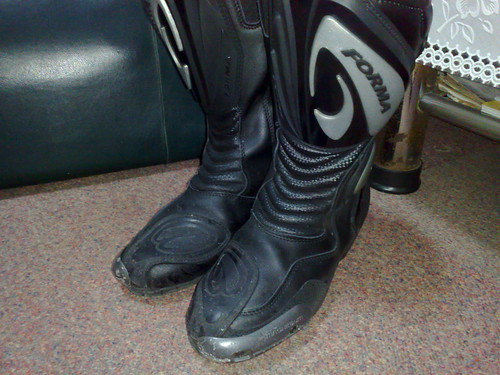
- Forma Riding Boots: A budget riding boots with sliders. Kept my foot from flying debris and rocks. However, not water-resistant enough to stop water from flooding the internals during our ride up to Hai Yat on the first day.
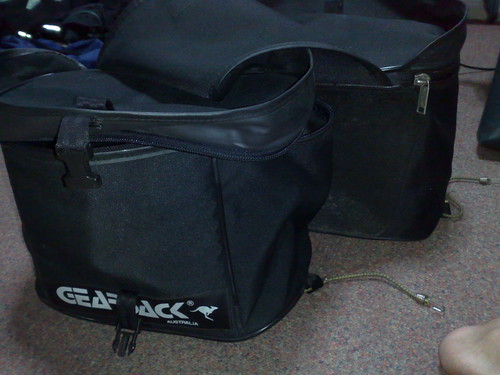
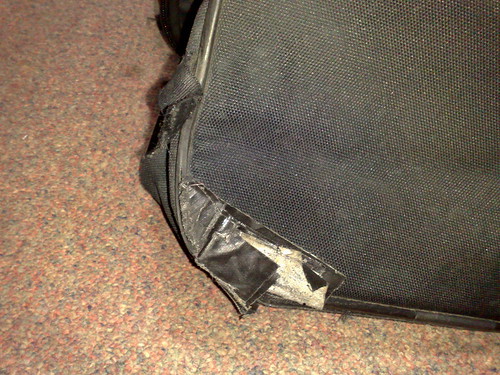
 - Gearsack Soft Panniers: This panniers had been with me for more than 8 years and still performing well in terms of waterproofing. Kept the stuffs in there dry and cosy. However, this pannier don't pair very well with my FZ1 as the unconventional grab rail design on the bike could not allow the panniers to secure properly. And the bottom of the panniers had been worned off by the rear tire due to abrasions during bumpy rides.


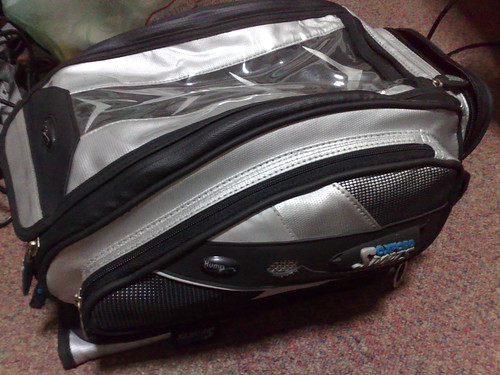
- Oxford Sports Humpback Tank Bag: AKG and I bought this for this trip as both our old tankbags are no longer waterproof. Have no problem stuffing my EeePC, electronics equipments, water bladder, maps together in this bag as its space size can be expanded. Due to the strong magnets, the tank bag secured very well on the tank and I don't see it wobbling during high speed rides. Good piece of gear

- Komine Touring Gloves: My almost decade-old gloves. Leather became hard as hell and caused a big blister on my palm. During the trip the velcro patch had torn off and I had to use the sewing kit from the hotel to temporarily secure it for the rest of the trip. Guess its time is due. TRASHED.


- Komine Back Protector: An essential gear for long trips. This gear had helped me prevent any potential backaches that may arise from the long hours of riding.

- Komine Spazzio Touring Jacket: After almost a decade of use, the jacket still performed surprisingly well and the waterproofing is still there. No complaints about it :)
 - Held Touring Pants: Got this about 7-8 years back. Provided good protection on my knees but the waterproofing properties are totally screwed. Inner liner had also torn beyond repair. TRASHED.
 - Power Commander 3: Thanks to the good tuning skills of Norman from Racewerkz, the bike's fuel efficiency had improved quite significantly and not to mention that overall throttle response had been smoother. The bike managed a maximum FC of 18.12km/L (highway runs) which not possible otherwise. It is also thanks to PC3 that the bike managed to survive thru Highway 105 (way southwards from Mae Hon Son) for more than 230km without a refuel.
- Nokia Maps 2: Running on my N95 8GB, this appplication enabled us to find nearby hotels and helped us pinpoint on our current location to reference with the map. However, at certain times it didn't point us to right route or direct us a longer route instead of a more straightforward one.
- Nokia Sports Tracker: I had been using this application since day one of the trip to keep track of the routes we have actually taken. After uploading to the website, we are able to see the overall routes taken throughout the trip. Alas, the phone crashed during the route from Krabi to Hat Yai and that part of the route is only partially tracked. A great piece of software nevertheless.
- Brembo Master Cylinder 19x20 + Venhill Brakelines: This combo is a life-saver. We ran into situations where we needed hard braking and it gives me total control on the braking pressure and stopped in time without mishaps. Definitely a good investment.
- Maxima Chain Wax: As I don't use Scotoiler for this bike, I relied on this product to lubricate the chain every 500km to maintain the chain performance. After 6000km, the chain was not even stretched a single bit.
- Lonely Planet's Thai Phrase Book: Oh yeah, had to borrow from AKG for the communication in Thailand. While I had learnt a couple of Thai words from there, I still have difficulties applying them on normal conversations LOL.
My Thoughts on This Trip
Well, this trip served a couple of purposes for me:
1) To go for the longest trip ever attempted by me
2) To see and experience the culture of another country
3) To use this chance to straighten out some personal thoughts
4) To experience an ironbutt rider's life
I would say that all the purposes had been served thru this trip. I had learnt a great deal about people, culture, biking, and many other things. I generally felt welcomed by the Thais' friendliness, their smiles, their generosity, their food and their lifestyle.
Will I go back again? You bet I will. It is definitely a good getaway from the hectic lifestyle in Singapore. That being said.... realised that tomorrow will be my first day of work in 3 weeks haha.
Videos
Now, for the videos I didn't managed to upload during the trip. Enjoy.
Loading up the Busa
Lighting up the Fire Balloon in Chiang Mai
Lighting up the fireworks
The fireworks and Fire balloons in the night sky of Chiang Mai
At the Mae Sai Boundary Post (North Thailand/Myanmar border)
Riding without helmets.....
A trip that was talked about 8 years ago in 2000 had been planned, executed and completed. This trip is a personal achievement for the both of us and we are glad that it had been fulfilled.
Now let's see the summary of this awesome trip:
Post-trip maintenance
As with all long distance trips, the main workhorse had to be serviced after a gruelling endless run on the road. For my Yamaha 2008 FZ1, the following components had been serviced:
- Tire: Changed to Pilot Power 2CT instead of the intended Dunlop Qualifier due to lack of fresh stock for the Dunlops
- Coolant: Flushed and recharged with a new bottle of Maxima Cool-aide coolant
- Engine Oil: Threw out the old black shit and poured in a new dose of Maxima Extra Fully Synthetic Oil
Equipment Used
- Forma Riding Boots: A budget riding boots with sliders. Kept my foot from flying debris and rocks. However, not water-resistant enough to stop water from flooding the internals during our ride up to Hai Yat on the first day.
 - Gearsack Soft Panniers: This panniers had been with me for more than 8 years and still performing well in terms of waterproofing. Kept the stuffs in there dry and cosy. However, this pannier don't pair very well with my FZ1 as the unconventional grab rail design on the bike could not allow the panniers to secure properly. And the bottom of the panniers had been worned off by the rear tire due to abrasions during bumpy rides.
- Oxford Sports Humpback Tank Bag: AKG and I bought this for this trip as both our old tankbags are no longer waterproof. Have no problem stuffing my EeePC, electronics equipments, water bladder, maps together in this bag as its space size can be expanded. Due to the strong magnets, the tank bag secured very well on the tank and I don't see it wobbling during high speed rides. Good piece of gear
- Komine Touring Gloves: My almost decade-old gloves. Leather became hard as hell and caused a big blister on my palm. During the trip the velcro patch had torn off and I had to use the sewing kit from the hotel to temporarily secure it for the rest of the trip. Guess its time is due. TRASHED.
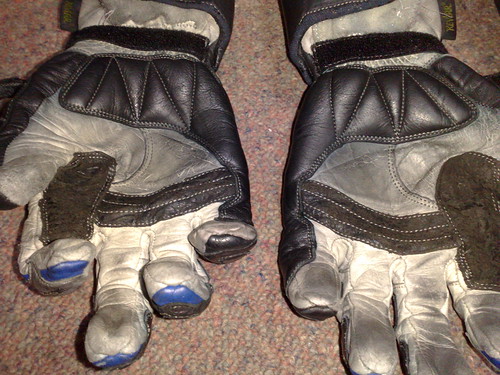
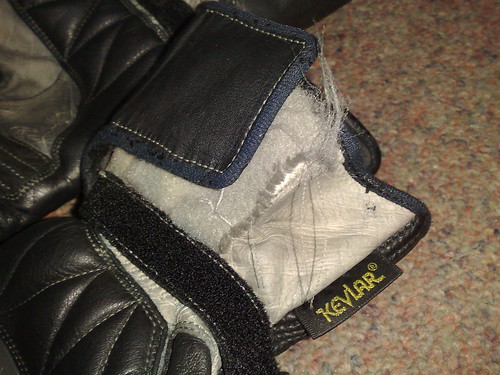
- Komine Back Protector: An essential gear for long trips. This gear had helped me prevent any potential backaches that may arise from the long hours of riding.
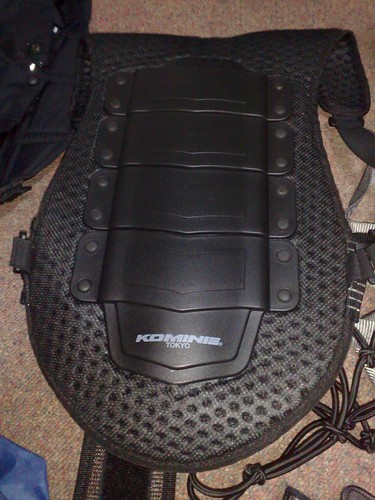
- Komine Spazzio Touring Jacket: After almost a decade of use, the jacket still performed surprisingly well and the waterproofing is still there. No complaints about it :)
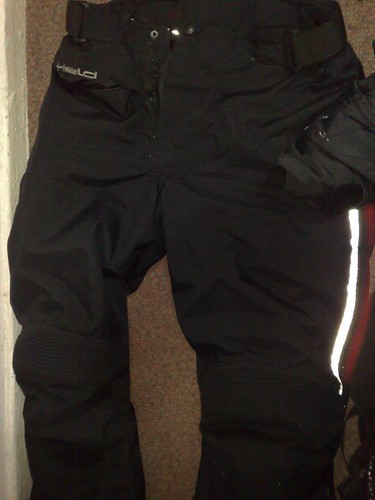
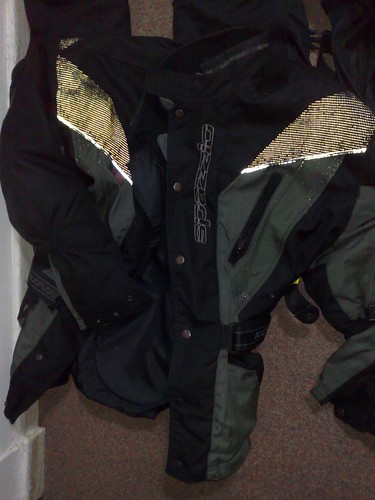 - Held Touring Pants: Got this about 7-8 years back. Provided good protection on my knees but the waterproofing properties are totally screwed. Inner liner had also torn beyond repair. TRASHED.
 - Power Commander 3: Thanks to the good tuning skills of Norman from Racewerkz, the bike's fuel efficiency had improved quite significantly and not to mention that overall throttle response had been smoother. The bike managed a maximum FC of 18.12km/L (highway runs) which not possible otherwise. It is also thanks to PC3 that the bike managed to survive thru Highway 105 (way southwards from Mae Hon Son) for more than 230km without a refuel.
- Nokia Maps 2: Running on my N95 8GB, this appplication enabled us to find nearby hotels and helped us pinpoint on our current location to reference with the map. However, at certain times it didn't point us to right route or direct us a longer route instead of a more straightforward one.
- Nokia Sports Tracker: I had been using this application since day one of the trip to keep track of the routes we have actually taken. After uploading to the website, we are able to see the overall routes taken throughout the trip. Alas, the phone crashed during the route from Krabi to Hat Yai and that part of the route is only partially tracked. A great piece of software nevertheless.
- Brembo Master Cylinder 19x20 + Venhill Brakelines: This combo is a life-saver. We ran into situations where we needed hard braking and it gives me total control on the braking pressure and stopped in time without mishaps. Definitely a good investment.
- Maxima Chain Wax: As I don't use Scotoiler for this bike, I relied on this product to lubricate the chain every 500km to maintain the chain performance. After 6000km, the chain was not even stretched a single bit.
- Lonely Planet's Thai Phrase Book: Oh yeah, had to borrow from AKG for the communication in Thailand. While I had learnt a couple of Thai words from there, I still have difficulties applying them on normal conversations LOL.
My Thoughts on This Trip
Well, this trip served a couple of purposes for me:
1) To go for the longest trip ever attempted by me
2) To see and experience the culture of another country
3) To use this chance to straighten out some personal thoughts
4) To experience an ironbutt rider's life
I would say that all the purposes had been served thru this trip. I had learnt a great deal about people, culture, biking, and many other things. I generally felt welcomed by the Thais' friendliness, their smiles, their generosity, their food and their lifestyle.
Will I go back again? You bet I will. It is definitely a good getaway from the hectic lifestyle in Singapore. That being said.... realised that tomorrow will be my first day of work in 3 weeks haha.
Videos
Now, for the videos I didn't managed to upload during the trip. Enjoy.
Loading up the Busa
Lighting up the Fire Balloon in Chiang Mai
Lighting up the fireworks
The fireworks and Fire balloons in the night sky of Chiang Mai
At the Mae Sai Boundary Post (North Thailand/Myanmar border)
Riding without helmets.....
Subscribe to:
Posts (Atom)