Showing posts with label Xgrind. Show all posts

Singapore Nokia Lumia 800 Preview

The Nokia Rangers are back together again on 1 December 2011 for a sneak preview of the upcoming Nokia Lumia 800. This is Nokia's first flagship Windows Phone since the announcement of the collaboration with Microsoft.

The Nokia team presented to us the UI and functionality aspect of the phone and how to effectively work with it to optimise our daily use.

Nokia team presenting the Lumia 800

Homescreen

Phone Information

People Hub (Social Feeds)

Contact Photos (grabbed from linked social networks)

Voice Search, but not as interactive as Siri of course
Outlook app in WP. I'm sold on this...

Below are the videos taken during the presentation (taken with N9 in low light condition), to better explain how the OS ecosystem works and also some answers to the Rangers' questions from local perspective.

Introduction and Contacts

Messenging and Emails

Internet & Bing Search

Apps and Music

Skydrive and Nokia Services

PR1.1 Update on N9


PR1.1 has been released early this week, but for Singapore variant phones, to date there is still no OTA available for users to upgrade.

So for someone who likes to have the latest version on his gadget whenever possible (yours truly), through the net, I have downloaded the flasher and Navifirm applications and download the firmware directly from the Nokia's server. After which I will flash the firmware manually into the phone.

What has been changed in PR1.1, based on the news I have gathered here are the info captured:

New Features
1. Music controls on lock screen (as well as the ability to see the signal bar/battery strength etc)
2. Photo and video shooting with color filters: black & white, sepia, vivid, negative, solarise.
3. Swype (not to be confused for Swipe).
4. Close apps easily by swiping down turned on by default.
5. Faster MfE synch, synchronizing only active folders
6. Noise cancellation reduces background noise so that your friends hear you better.
7. New indicators for standby screen like charging and calendar etc.
8. You can now upload pictures to Twitter directly through the 'sharing' function.
9. Switching between VKB has changed. Previously you could swipe from the middle to change but now its from the side.
10. Better/smoother scrolling. E.g. In the contacts list.
11. Better multi-tasking. Native apps especially open much faster. App Store loads and operates much more smoothly.
12. New way to set default avatars (Settings->Applications->Contacts)
13. Gallery - New presentation of how pictures are displayed. You can now scroll using date ranges.
14. Bluetooth now has a on/off button on the pull down bar by default. Previously you had to enable this view in settings.

Fixed Bugs
1. It is easier to bring up the VKB when typing a SMS. Previously you would have to hit the typing area multiple times.

One of the more welcoming features is the inclusion of Chinese test input, and also the famed Swype keyboard. As compared to the Nokia's keyboard, Swype's layout looks much more familar to those who are used to smartphone keyboards from other platforms.


Over the last 2 days I have noticed a improvements in the smoothness of the UI, seems snappier. Updated native Facebook and Twitter clients is now draws feeds faster instead of waiting forever.
However, still disappointed that folder organisation for app menu is still not included in this build but I hope PR1.2 will include it.
One thing to note that while I'm not sure about OTA updates, flashing the firmware the way I do (without clearing data partition) will remove all your installed apps and everything will revert to default settings. No big deal if you have done backup earlier on.

Refreshment for the Beast

The yearly major servicing for the FZ1S has finally come again

Much of the components on the bike are due for servicing and I also need to prep it for the next coming track session

Most important part to go is the tires. The Dunlop Alpha 11 had proven itself for the past year as an excellent sports tire that provides good performance on the road and track alike. As it has reached its maximum heat cycles I have let go of it even though the wear on the tire is still moderate. This is one thing I cannot afford to be stingy on. As much as i want to get back the same Alpha series, Racewerkz had run out of stock for the Alpha 12. Alternatively Norman tried to convince me the Bridgestone R010 semi-slick tire, but due to its poor performance on wet weather (and I still do travel in wet weather from time to time) I have to give it a pass. Instead, I chose the Dunlop Sportmax Qualifier II. I had used the Qualifier in the past, it provided a balanced performance so picked this up for the bike this time round.


Next, the fork, radiator and brake system are due for change of fluid as well. For the fork I changed the oil to iPone grade 7 fork oil, which gives a harder damping feel to the fork.

The Maxima Cool-aide Coolant has been on the bike since day one so no change this time round since this coolant has been serving well all these years.

For the brakelines, I replace the Motul brake fluid to the iPone DOT4 300 brake fluid which I need more time to assess its performance before I can comment on it.


The Air Induction System has been blocked off as well so from now, no more popping noise from the exhaust whenever I perform quick deceleration. Somehow the tone from the exhaust has changed a bit too, seems to be slighter more bassy.

Thanks to Norman's persistent recommendation, he showed me the GB Racing engine protection covers that will help prevent catastrophic engine damage during accidents. I was just hesitating, thinking that I can wait till my next visit to Racewerkz before I install. Just nice, a biker friend of mine visited the shop directly from PG and he has shown me his crashed (but still ridable) bike and the protection the covers had given to the engine. He would have paid more for engine repair if the covers are not there to help. That prompts me a decision to immediately install the covers on the bike. Since I'm going to install them sooner or later, might as well do it on the spot while the stock is available.

Now the bike is all prepped up for the next track session. Woot

Save The Date: Nokia's new formula for success is on its way

Received email from the Nokia's Rangers programme PR agency... looks like this session will be about a flagship business phone. Will know more on Thursday. Woot.


Union of a Kiwi and Singaporean: My Family

Well well well,

After about 2 months of arranging, rearranging, changing of dates, Liam, Phoebe and family has finally come to a finalised date to have their Singaporean ROM ceremony down here.

Their main (and major) wedding will be held in New Zealand somewhere in September but down here they will be Husband and Wife in Singapore law. The one held in Singapore will be a simple and casual yet solemn ceremony, inviting only close friends and family to witness this wonderful moment.


Liam_Bee_ROM_8_Feb_2011_2Liam_Bee_ROM_8_Feb_2011_3
A game of Zombie fragging while waiting for the ladies to finish up Bee's makeup

Liam_Bee_ROM_8_Feb_2011_6
All set and ready to go

Liam_Bee_ROM_8_Feb_2011_12
JP verifying the ID details just to make sure Liam is marrying the right Phoebe and vice versa :p

Liam_Bee_ROM_8_Feb_2011_15
The bouquet and the rings (their names are on the rings, can you spot them?)

Liam_Bee_ROM_8_Feb_2011_19
Oppps did I forget something?

Liam_Bee_ROM_8_Feb_2011_22
The solemn ceremony begins

Liam_Bee_ROM_8_Feb_2011_24
Putting on the rings

Liam_Bee_ROM_8_Feb_2011_26
Reading the vows

Liam_Bee_ROM_8_Feb_2011_29Liam_Bee_ROM_8_Feb_2011_30
The couple signing the Marriage certificate

Liam_Bee_ROM_8_Feb_2011_31Liam_Bee_ROM_8_Feb_2011_32
Witnessed by Father and Bee's friend

Liam_Bee_ROM_8_Feb_2011_34
Lastly, JP endorsed the certificate......so.....

Liam_Bee_ROM_8_Feb_2011_36
BEE IS NOW OFFICIALLY MRS PURCELL!

Liam_Bee_ROM_8_Feb_2011_38
The couple, the family and the guests......

Liam_Bee_ROM_8_Feb_2011_47
Having a shot with Liam's new Parent-In-Laws

Liam_Bee_ROM_8_Feb_2011_54
Liam going through the tea ceremony with Bee explaining the process at the same time...bet Liam's multitasking during that time LOL

After all these, the entire group have a lunch at the same venue where we chit-chat away, making fun of the couple and of course, good chance for Liam to know Bee's friends better.

All in all, the ceremony was simple, and everything went smoothly without a hitch. "All good in the hood", I quoted my new Brother In Law ;)

Liam_Bee_ROM_8_Feb_2011_57

Congratulations, Liam and Bee!

A Surprise CNY Gift from Nokia

This one is an unexpected total surprise. I was working when I received a sms from Nokia rep agency, telling me that Nokia has a CNY gift for me and will courier to me on the same day.

So thinking may be some card or vouchers, I just gave the address and didn't think much about it.

Later in the afternoon, when I was casually surfing the Hardwarezone forums, I seen the Nokia Rangers mentioning that they received the new Nokia C7 as the CNY gift. Soon after a call from the courier confirms it.

Going back home, I checked out the package and along with the C7, comes with other goodies like Nokia magazine, chocolate, a bottle of white wine and Nokia MD-11 mini speakers.

It's very nice of Nokia to give us yet another phone to play with during the CNY holidays. This will allow me to play with a new toy for the holiday week before I give a review for it.

Meanwhile, check out the unboxing video.

Note: the audio has been disabled due to usage of copyrighted music, so the video is in the progress of replacing with unlicensed music, so you might experience audio-less video during this period.


My First Attempt at Exposure Blending

Recently I managed to capture a very very nice sunset shot which I love very much. Armed with my Tokina 11-16mm wide angle lens, I noticed that having just the sunset skyline as the photo isn't going to make a statement. So took bracketing shots at different exposures and decided to try out exposure blending to bring out the foreground as well as the background. Some of the results isn't quite what I have expected but it gave a very different feel to the photo.

Using photoshop to do exposure blending is tedious, but fun nevertheless. Guess will try more of these in future.

Meantime, enjoy my first attempts. Not outstanding but still viewable, heh.

DSC_9117

DSC_9170

DSC_9191

New Addition to FZ1: Radiator Fairing


My pal, Rudy, actually gotten this product from overseas and replicate it locally (yes, what I installed is a replication of the real thing). He wanted to get enough people so that he can replicate it at a good cost. Once he has gotten the replicated products, he passed me one more than a month back (yes you heard it right), asking me to install it on my bike.


Well, due to busy schedule and other commitments, I kept pushing it off until yesterday. Finally found some time to fix this fairing on my bike and see how it looked.

Well, installation is a breeze, all I need to do is to remove the original radiator side panels and the small cover (which I wonder the purpose of it) on the frame, using the custom made riser screw boss on the radiator and everything is completed in less than an hour.

Custom Riser Screw Boss

How It Looked after installation.


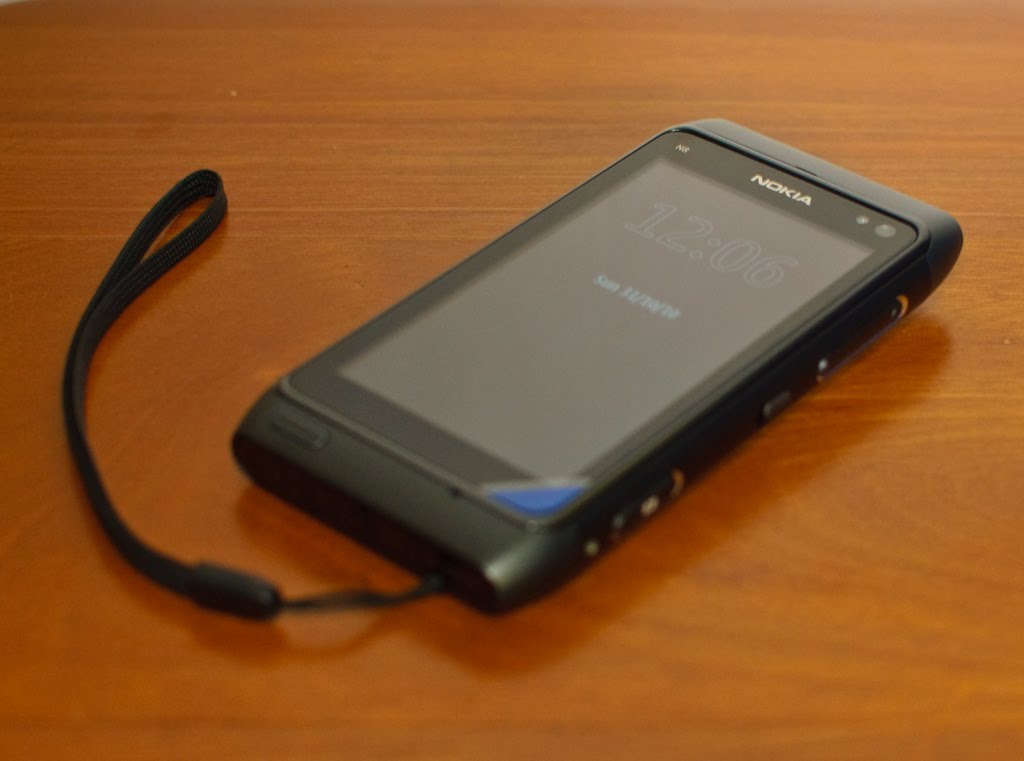
Personal Review of Nokia N8-00


Ok, it's been more than a week since I was given a N8 for keeps by Nokia, and I had put aside my Android phone to use the new Nokia flagship for a proper user review.

I had configured the phone to be up for my daily use, including my office work. My use of this phone on normal days are mainly:

- Internet surfing (a lot)
- Social-Networking (regularly)
- SMS and making/receiving calls (duh)
- Checking emails (office and personal)
- Taking photos and videos
- Watching movies on the go
- Playing games on the go
- Listening to Music
- letting colleagues/friends play with the phone prior to its launch

So my review will be based on my usage and also will make some comparison with Android so that Nokia will understand what they are really lacking and improve on it (if they are reading this blog that is)

Hardware

Enough said, the specifications has been described to death by many blogs and techno-sites so I will just give a brief summary of the hardware

The body is made of anodised aluminum alloy at the centre with 2 plastic end covers. It feels very very good at the palm and does not feel heavy. In fact it gives you a very solid build feel, which it is. I came from Quality field so trust me on this, the exterior is very well done.

On the screen, it uses capacitive touchscreen technology on an AMOLED screen and placed the famous Gorilla glass (claimed to be very resistant to scratches and impacts) as the topmost layer of the screen. If you trust the glass enough, you can even use the phone without screen protector

For the rest of the hardware description, I will let the photos do the talking.


12 Mega Pixel Camera sensor (claimed by Nokia to be the biggest sensor used in mobile phones) with 28mm/2.8f Carl Zeiss lens. Oh it comes with Xenon flashlight, so you have strobe flash for photo capturing

The top of the phone comes with mini HDMI port (HDMI adaptor cable included) for connection to HDMI TV/projector. Besides it are the 3.5mm audio jack and power button (acts as forced shutdown when pressed for more than 10 seconds)

Left side is the MicroSD and SIM slots with microUSB port which functions as USB OTG (cable adaptor included) as well as for charging/datasync. The torx screw shown is for the bottom cover where the battery compartment is located. No easy way to replace battery unless you have a torx screwdriver

On the right side of the phone is the Camera button (which can activate the camera app with one press), the lock switch and the volume rocker. The buttons have very good tactile feel.

At the bottom, you have the mic right below the screen, the menu button (acts as task manager when press and hold for 1-2 seconds) and the mini charge port. You may wonder why 2 charging ports on N8. Simple. You can charge your phone while you are using USB keyboard/mouse thru the microUSB port (USB OTG feature). Not a frequent use case considering the massive mass memory (16GB) but useful nevertheless. Touch more on that.

Camera


The Good

- Very very good photo quality from the camera. Certainly a competent replacement for compact cameras

- Xenon flash is able to light up the subject adequately in low light condition.
- Allows geotagging
- Many scene modes to choose from, plus many manual adjustments like Exposure, White Balance, ISO, and face detection
- HD Video quality is really good with decent audio. No video/audio sync issue at all


The Bad
- Photo resolution uploaded via camera/share feature are pretty low as compared to upload it via email on the phone

- The bottom keys on the camera (Option/Exit) is not responsive to touch, esp when camera orientation is in portrait mode.


Here are some example shots:

Landscape Mode

Auto mode with Flash
Close up mode without Flash

Close up mode with flash

Phone/Screen

The Good

- Very good signal reception as compared to my Android phone in the same location = fewer dropped signals

- SMS messages now in threaded mode (finally) in the form of Conversations akin to N900 UI, as well as the old style S60 SMS folders

- SMS emoticons are supported in Conversations

- Voice call quality is superb. Loud and clear.

- Missed call/message/events widget is very useful on the home screen
- Liked the Favorite Contacts widgets, as i can add as many contacts as I can and just swipe to find the contact I want

- Screen is readable even in direct sunlight, as compared to my AMOLED Desire, which is barely readable.

- T9 Prediction on the keypad in portrait mode is good and functional

- Pictures on AMOLED is crisp and colours are adequately saturated. What you see on the N8 will be as brillant & vibrant as seen on LCD monitor. Not over-saturated like Desire, which gives user false sense of photo saturation.

The Bad

- Why the hell Nokia removed the "Slide to Pickup/Reject" feature seen in N97/5800XM? It is one of the best features in S60 5th edition and now it's gone. A step backwards.
- The search in Contacts book is not intuitive. Android/iOS phones, even N900 is able to search the contacts in real time just by typing the name. The search app is ok, but took many steps to achieve the same objective as compared to Android/iOS/Maemo counterpart.

- No choice of portrait qwerty keyboard

- Landscape keyboard is not very intuitive. I kept getting typo errors and the prediction don't help much. Have LOTS of room for improvement, Nokia may want to reference iPhone/Android keyboard for a clearer direction
-
No notification icon(s) on Big Clock screensaver. Waste of good screen estate.
- I still experience lags in the UI transitions, even though I don't install much apps (<10).>- To have Cleartype-style anti-aliasing effects on the font display or better font. Current font display feels very pixelated


Multimedia

The Good

- Loudspeaker is really LOUD

- Audio quality from the 3.5mm jack is balanced. Tight bass and clear treble

- Music Player comes with equalizer, which is lacking in Android
- Video Player can play my H.264/263 encoded avi files without re-conversion. Video shown on screen is very sharp and no audio/video sync

- Photo editor is very comprehensive for a mobile phone and workable
- Music Synchronisation is a breeze with Windows Media Player or Ovi Music Player
- HDMI output from the phone is sharp and crisp. Managed to output one Chinese movie to a 40" TV for family viewing and they were impressed by it
- USB OTG is very convenient for transfer to your photos/music/movies to/from flashdrives easliy, although it is not a very common use case for me.

The Bad
-
Need to have a ringtone trimmer software built in like Android Music Player
- No external subtitle support for video player
- No ID3 Tag editor built in like the 5th edition Music Player
- The cover flow effect is only for ALL songs category. How about Playlists, Artist, Albums, etc?
- It will be great if there is player control at the saver screen. Save the hassle of unlocking the phone just to change songs
. Yes, there's the unlock, but consider those poor dudes (like me) who have remote PIN lock by Exchange mail server remote security features.


Internet/Social Networking
Seriously, this is my main gripe in N8. I see less good than in this area. Nokia has a lot (yes I mean a lot) to catch up

The Good
- Web browser able to play flash items natively
- Able to upload photos to Facebook/Twitter via Social

The Bad
- Still using Flashlite when competitors are already having Flash 10 running on their mobiles
- Web Browser hanged when I surfed heavy sites, must have thanks to the limited RAM yet again
- No popular Photo sites upload (Flickr, Photobucket, etc)
- Social app integration is pretty weak, slow startup, erratic display,
- Nokia messaging a bit dodgy. Multiple photo uploading will prompt for email account but will not prompt if uploading only one photo.

- Email Inbox overview font is very ugly and big (bold). Doesn't blend with the UI look at all. Nokia should consider changing to better font and smaller fonts


Conclusion

After one week of use, considering I'm someone who uses internet apps and surfs extensively on the phone, I went back to Desire as my main phone and N8 as my camera/music player due to the above comments.

You also noticed that I did not touch on Ovi Maps at all, as frankly I have not used it much but I am confident in this application since this app in its earlier versions has already brought me around Thailand using my N95 8GB

Seriously, N8 hardware is uber impressive in terms of build, connectivity and camera optics, but heavily maimed by a dated OS. I strongly believe this phone will shine should it runs on Meego instead of Symbian. I have used N900 (Maemo) before so I can see Meego's potential.

N8, in its current state, is good for people who are looking for solid camera performance that can replace their compact cameras and good multimedia capabilities plus good telephony functions.

However, if you are looking for very internet-centric phone, where you will surf a lot on the phone, then it's better to look at other options.

Of course, I am still hoping in the upcoming updates, the functions/features of the phone will improve cos I certainly will like to use N8 as a main phone when that happens.

But I seriously I will hope Nokia can give the N8 users an option to load Meego instead of Symbian to see if it can bring this phone to the next level (I must be dreaming keke)