Showing posts with label Technology. Show all posts

Singapore Nokia Lumia 800 Preview

The Nokia Rangers are back together again on 1 December 2011 for a sneak preview of the upcoming Nokia Lumia 800. This is Nokia's first flagship Windows Phone since the announcement of the collaboration with Microsoft.

The Nokia team presented to us the UI and functionality aspect of the phone and how to effectively work with it to optimise our daily use.

Nokia team presenting the Lumia 800

Homescreen

Phone Information

People Hub (Social Feeds)

Contact Photos (grabbed from linked social networks)

Voice Search, but not as interactive as Siri of course
Outlook app in WP. I'm sold on this...

Below are the videos taken during the presentation (taken with N9 in low light condition), to better explain how the OS ecosystem works and also some answers to the Rangers' questions from local perspective.

Introduction and Contacts

Messenging and Emails

Internet & Bing Search

Apps and Music

Skydrive and Nokia Services

PR1.1 Update on N9


PR1.1 has been released early this week, but for Singapore variant phones, to date there is still no OTA available for users to upgrade.

So for someone who likes to have the latest version on his gadget whenever possible (yours truly), through the net, I have downloaded the flasher and Navifirm applications and download the firmware directly from the Nokia's server. After which I will flash the firmware manually into the phone.

What has been changed in PR1.1, based on the news I have gathered here are the info captured:

New Features
1. Music controls on lock screen (as well as the ability to see the signal bar/battery strength etc)
2. Photo and video shooting with color filters: black & white, sepia, vivid, negative, solarise.
3. Swype (not to be confused for Swipe).
4. Close apps easily by swiping down turned on by default.
5. Faster MfE synch, synchronizing only active folders
6. Noise cancellation reduces background noise so that your friends hear you better.
7. New indicators for standby screen like charging and calendar etc.
8. You can now upload pictures to Twitter directly through the 'sharing' function.
9. Switching between VKB has changed. Previously you could swipe from the middle to change but now its from the side.
10. Better/smoother scrolling. E.g. In the contacts list.
11. Better multi-tasking. Native apps especially open much faster. App Store loads and operates much more smoothly.
12. New way to set default avatars (Settings->Applications->Contacts)
13. Gallery - New presentation of how pictures are displayed. You can now scroll using date ranges.
14. Bluetooth now has a on/off button on the pull down bar by default. Previously you had to enable this view in settings.

Fixed Bugs
1. It is easier to bring up the VKB when typing a SMS. Previously you would have to hit the typing area multiple times.

One of the more welcoming features is the inclusion of Chinese test input, and also the famed Swype keyboard. As compared to the Nokia's keyboard, Swype's layout looks much more familar to those who are used to smartphone keyboards from other platforms.


Over the last 2 days I have noticed a improvements in the smoothness of the UI, seems snappier. Updated native Facebook and Twitter clients is now draws feeds faster instead of waiting forever.
However, still disappointed that folder organisation for app menu is still not included in this build but I hope PR1.2 will include it.
One thing to note that while I'm not sure about OTA updates, flashing the firmware the way I do (without clearing data partition) will remove all your installed apps and everything will revert to default settings. No big deal if you have done backup earlier on.

Review of N9 (Singapore Variant)


Back then in 2010, there was N900, N9's predecessor. It was running on Maemo (before merging with Intel to rename as Meego) and the device was a niche gadget in the telecommunication world. It was marketed as an Internet Tablet WITH basic phone functionalities.

Now, Meego has matured in a way where Nokia can finally market N9 as a smartphone instead of Internet Tablet, which Maemo fans has always wanted it to be.

I have gotten the N9 for trial during the Nokia Rangers event on 6th October 2011, just weeks before the N9 is officially launched. The group's task is to review the phone, and also let their friends and peers to experience the new UI implemented on the phone. with a brand new platform, Nokia needs all the publicity they can find to promote this phone and let the mass know about it.

So here you are, a review of the N9 based on my day-to-day usage since I gotten the phone.

Costmetics/Design

I never have doubt in Nokia's mechanical competencies. They DO make solid hardware, only to be played down by their weakest link: Software. Will N9 with Meego change all that? We shall see.

I digress, back to externals.

The phone is monoblock design, as with most touchscreen smartphones nowadays. The back casing is made of polycarbonate plastic which is known to be tough and durable. So it's pretty scratchproof.
The screen glass is made of Gorilla glass that is known to resist scratches. In my use without the screen protector, I haven't even gotten a scratch on the glass at all. For your info, the phone is in my jeans (with coins and stuffs) and survived a bike crash (the phone rolled along the tarmac) with the glass scratchless.

According to Nokia, the display is assembled on the glass with ZERO air gap, hence providing very good viewing angles and gives the impression that the icons "float" on the glass. You will have to see the screen for yourself. The AMOLED display with Clear Black technology gives the display very vibrant and lively colours, and it is still visible under direct sunlight. In short, the display did not fail to impress.

The phone only have 3 mechanical buttons: Volume UP, Volume DOWN and Power/Standby button. This gives the phone a very clean look in the design. It also comes with microUSB port which is covered by a levered cover (I find it good as it protects the port from dust when not in use)

The phone comes in 16, 32 and 64GB variant and what I reviewed is the 16GB version. One of my peeve is  the inability to expand my storage with a microSD as the phone do not cater for it.

Battery is also non-removable due to the design nature of the phone but for me I have no issue with that since I never have the habit of changing batteries all the time for I charge my phone everyday.


Micro USB port hidden under the spring hinged cover and MicroSIM slot beside
Features

The phone runs on the Linux based OS called Meego, formerly called Maemo which runs on N900.

The UI concept eliminates the use of physical buttons and intended to use gestures for the common functions. Closing, minimising apps are all done with a single swipe.

There will be 3 home screens: Events, Applications and Running Tasks.

Events - This screen will show several information on the page: Twitter/Facebook feeds, Missed Calls, Unread Messages, and Calendar Appointment alerts.

Applications - This screen will show all the installed and pre-loaded apps in one page. While scrolling through the apps are smooth and fast, there is no app folder support in it so you can only manually shift your most used icons to a most convenient spot for your easy navigation. Even internet bookmarks are displayed as icons by itself, meaning if you have 30 bookmarks (conservatively speaking, but I believe normal users will have more than that) you will see 30 bookmark icons on the application screen. In my opinion, this is MESSY. Having folder support will be a great remedy to resolve this and I certainly hope Nokia will include that in the next update.

Running Tasks - This is where all the running applications are displayed in this screen, in the form of "screenshots". The application icons can be displayed in 2 x 2 grid or 3 x 3 grid, using the pinch zoom gesture. You can close the applications (other than swping down in the app itself) by press and hold on the icon and you can select the app(s) you want to close. There is also an option for you to close all at once.

Phone Functionality

Phone Speaker - With only one speaker at the bottom of the phone, it is no surprise that the volume level coming out from it will not be loud as compared to 5800 Xpressmusic or N8. Personally I find the speaker pretty soft and had a few missed calls due to not able to hear the ringtone

Phone Calls & Reception - Very typical of Nokia phone, you can always rely on their phones when comes to signal receptions and phone call quality. This is one area Nokia excels in. I can get very good reception with comparison to my other Android phone in the same area and voice quality on the ear speaker is clear, albeit slightly soft. I believe this can be tweaked in the next update.

Messenging - Nokia integrated Ovi Chat, Skype, SMS, MMS and IM in one messenging client, hence you will only need to get used to one UI for all your IM accounts. Typing on the on-screen keyboard is a breeze as the prediction and correction mechanism worked wonderfully well. Coming from a user used to onscreen keyboards on big screens, this gets a thumbs up from me. Only gripe I have is the lack of Chinese input support but Nokia ensured that the Chinese IME will be included in the next update.

One negative aspect is that there is no way of customising the theme of the messenging application. While it is possible to customise it, the geeky way (coming from N900 experiences), Nokia needs to enable theme changing capability if it wants to capture the masses for this phone.


Camera

The N9 comes with a 8MP camera sensor with Carl Zeiss optics, giving the usual superior cameraphone photo quality from Nokia. It is capable of recording videos up to 720p resolution and able to perform auto focusing. There are quite a arsenal of settings for your photo taking needs. One thing I noticed on this firmware is that the macro mode focusing is not working, which I hope Nokia can fix it ASAP, since I am one of those users who uses macro mode very frequently on the phone.

You can view the photos I have taken during the course of using this phone at my Flickr site

http://www.flickr.com/photos/xgrind/sets/72157627710922683/

What I have noticed is that the camera app will start up slower as I installed the phone with more apps and media files.

Focusing can be made at any part of the screen, just tap on the spot
Different photo modes are available for you to choose from


Internet and Connectivity

Nowadays, internet browsing on phones is a common thing and user expectations on mobile browser is getting higher by the day. In N900, its internet browser is considered the fastest and capable flash-supported browser in its time. On N9, its improved browser do not fail to impress either. Page rendering is fast and able to manage flash heavy sites. The tabs/windows are opened in the form of different tasks so in the running tasks screen, you will see individual webpages from the internet browser as icons.

I don't even have issue accessing the desktop version of HWZ forums. The internet browser is fully capable of satisfying the user's internet surfing needs. 

While I understand Nokia has simplicity in mind when designing the browser, meaning removing options to set an array of browser settings (except to clear cache/history/cookies), I feel restricted when I can't do any advanced settings in the browser to suit my needs. However, I feel that current browser implementation is good enough for day to day surfing needs.

The standard connectivity options like bluetooth, USB tethering are available in this phone as well, working flawlessly. Following the C7, the N9 also incorporates a NFC chip that can easily pair with a NFC equipped devices, sending locations & files to another NFC phone and other potential solutions like tapping on NFC-enabled advertisement boards for information or book a cab using NFC booking sign. What I really wanna see is an app to able to read our EzLink cards for transaction records and value.

A new addition in contrast to past Nokia phone is the inclusion of Wifi Hotspot. This means you can now share your 3G mobile broadband connection to other wifi-enabled devices by making your phone into somewhat of a mobile internet router. Setup is pretty easy and self explanatory and it also have the information of how many devices are connected to your phone and how much data is being used. Very important for those who have limited data plan.

Navigation

I only tried the Navigation twice, but the impression Nokia Maps gave me is, awesome!

Other than the gimmicky 3D buildings on the maps (which I don't really fancy), the navigation features are very complete and finding the location using search is pretty accurate.

Using the turn-by-turn navigation is a breeze and delightful experience. Lock on is fast, navigation guidance is clear and concise and the movement on the map is smooth.

With a quality navigation application, giving you free worldwide navigation, what more can you ask for?

Gaming and Multimedia

Ok, nowadays gaming is now a big part of mobile communication industry and to catch up with the competitor, how can N9 not keep up with the rest of the players?

The phone comes pre-loaded with a couple of games like customised version of Angry Birds (need to pair with other NFC phones to unlock stages), Need for Speed and Galaxy on Fire. Gamplay on the AMOLED screen gives the games a vibrant colour and the phone manages the framerates quite well. However, to me playing game on such a small screen is not entirely enjoyable since I'm already used to >4" sized screen for gaming. For those who just ventured into the smartphone world or upgrade from a low-end smartphone, you will be delighted by its gaming capability

The photo gallery is nothing new from N9, with the photos are arranged in tiles with the latest taken photos on the top. On the bottom bar is the category field where you can perform filtering based on camera taken photos or imported photos (depends on which folder you place your photos into). The gallery also supports sharing to Facebook, Flickr and Twitter and I simply love the extensive options it provides for the sharing function. You can even indicate which album to park your photos and this function is provided natively!

Transferring music to the phone is a no-brainer and a breeze to do so, BUT transferring playlists to the phone is big challenge. I stored my music collection in iTunes and I tried 3 apps: Mediasync, Doubletwist and Nokia Link, all 3 apps failed to properly transferred the music playlists over. The playlists are transferred over but the playlist contents are empty. The songs are transferred though but if you have 5GB of mp3s with different genres, it will definitely be a bloody big pain! To me, this is a MAJOR deal breaker.

Final Thoughts

The Good

- Great unibody design gives a good and comfortable grip on the phone
- Curved glass gives the phone a unique identity and feel
- The Swipe UI is intuitive and refreshing, with a very low learning curve. Users can easily familiarize themselves with the phone within an hour
- Good photo quality from a cameraphone, easily replacing a PnS camera
- NFC feature sees great potentials in application usage if more developers are attracted to make more apps
- Smooth internet browsing experience
- Great navigation feature and it's free

The Bad

- No direct Music control on the lock screen. This will be great if a play control widget is on the lock screen so consumers can change tracks fast without unlocking the phone.
- App folder on App Screen is highly recommended. As I add more bookmarks and apps, it's going to be a long list of icons I have to swipe thru. iOS and Android have that feature for a good reason.
- Auto focus in camera's Macro mode not working. This is a MUST FIX. I can imagine how the consumer will react upon knowledge of this.
- When using battery pack to charge using the data cable, it will prompt a message indicating not enough power from the USB to charge the phone. It is a 1A output port and it charges properly when I use a dateline-disabled USB cable. To an unsuspecting consumer, he/she will have thought that the phone is being charged but it's not.
- Music playlists from my iTunes are not properly transferred to the phone via Nokia Link.
- Why only 8GB is available for media files? What happened to the other 7+ GB? I understand some space is required for system and applications but surely we don't need 7GB for that right?
- The lack of high-quality applications like Whatsapp in the store gives the phone a losing edge against Android and iOS


I will say, for seasoned iOS and Android users, they will find pretty crippled when they switch over to N9 largely due to the lack of common apps in Android and iOS like Whatsapp and Kindle and may not enticed them to switch over to Meego. Unless Nokia worked with developers intensively to push out good quality apps within a couple of months, N9 will lose its novelity pretty fast and people will just forget about this phone.

Personally, having used Symbian, Maemo, Android and now Meego, I see a good potential in this OS and I certainly wish to see this OS mature at a faster pace to join the mainstream  market. It will be a waste if the OS is cast to oblivion due to slow development of apps that detract potential users away.

Save The Date: Nokia's new formula for success is on its way

Received email from the Nokia's Rangers programme PR agency... looks like this session will be about a flagship business phone. Will know more on Thursday. Woot.


A Surprise CNY Gift from Nokia

This one is an unexpected total surprise. I was working when I received a sms from Nokia rep agency, telling me that Nokia has a CNY gift for me and will courier to me on the same day.

So thinking may be some card or vouchers, I just gave the address and didn't think much about it.

Later in the afternoon, when I was casually surfing the Hardwarezone forums, I seen the Nokia Rangers mentioning that they received the new Nokia C7 as the CNY gift. Soon after a call from the courier confirms it.

Going back home, I checked out the package and along with the C7, comes with other goodies like Nokia magazine, chocolate, a bottle of white wine and Nokia MD-11 mini speakers.

It's very nice of Nokia to give us yet another phone to play with during the CNY holidays. This will allow me to play with a new toy for the holiday week before I give a review for it.

Meanwhile, check out the unboxing video.

Note: the audio has been disabled due to usage of copyrighted music, so the video is in the progress of replacing with unlicensed music, so you might experience audio-less video during this period.


Nokia Rangers N8 Information and FAQ

Just received an updated N8 FAQ from Nokia last week, and after seeking clearance from the Rangers contact, I will post the FAQ for every N8 users' benefit.

4 THINGS YOU’LL LOVE ABOUT THE NOKIA N8

  • Create amazing content
The Nokia N8 offers excellent imaging capabilities with a 12MP camera featuring Carl Zeiss Tessar optics, a Xenon flash and a sensor that rivals those found in many compact digital cameras. The Nokia N8 also introduces the ability to create HD-quality videos and edit them with an intuitive built-in editing suite.
  • Connect your future
All your most popular social networks are brought onto one platform to ease conversations. Deep integration with social networks like Facebook and Twitter, allow you to easily update, share location, post comments, view live feeds and upload photos wherever you are in a single app directly on the home screen.
  • Entertain
The Nokia N8 offers a true home theater experience with HD quality film and Dolby Digital Plus surround sound by simply plugging the device to your home theatre system with an HDMI cable. With the Web TV services you can also watch programs from both local and global channels like E! Entertainment, Paramount, CNN and National Geographic, Channel News Asia, Makansutra and more.
  • Applications at a touch
Find any app for your every need, from managing your daily calendars to monitoring your heart rate at the gym. Gone are the days when your phone was just for plain messaging and making calls. With a smorgasbord of apps available on the Ovi Store, you can mix and match according to your own personal lifestyle needs! The N8 also features three completely customizable homescreens, which can feature those apps and updates that you want.

What are the key features of the Nokia N8?

  • Camera
A 12MP camera with Carl Zeiss optics, Xenon flash, and a large image sensor, High Definition 720p video capture with two microphones that enable great ambient sound. Comes bundled with video and image editing software as well as USB on-the-go to transfer files directly with USB mass memories such as memory sticks.
  • Social Networking
Update your status and get live feeds from Facebook and Twitter, send messages or share location and photos all from the homescreen of the Nokia N8! Syncing events from your social networks calendars onto the Nokia N8 device calendar is easy and ensures your events and appointments are only a few touches away.
  • Symbian ^3
The Nokia N8 is the world's first device with Symbian ^3 software, offering a fast, simple and intuitive UI.
  • User Experience
The Nokia N8’s user experience is greatly enhanced with support for gestures such as single tap, simultaneous-touch, flick scrolling and “pinch-to-zoom”. Three customizable homescreens, faster and more responsive graphics accelerators and efficient memory management also allows for a complete multi-tasking experience
  • Entertainment
The Nokia N8 is the first smartphone to offer a true home theater experience with HD quality film and Dolby Digital Plus surround sound by simply plugging the device to a home theatre system with an HDMI cable. The Nokia N8’s Web TV services deliver TV programs, news and entertainment from channels such as CNN, National Geographic, E! Entertainment, and Paramount. Local Web TV content is also available from the Ovi Store.
More info here: http://bit.ly/n8features

CAMERA & VIDEO
  • What is the camera in the Nokia N8 like?
The 12 MP camera with Carl Zeiss optics, Xenon flash and large image sensors results in great photos even in low-light conditions with image capture speed of less than 0.5 seconds.
The image sensor is larger than any other mobile phone camera ever introduced. Pixels are over 47% larger than broadly comparable handsets. Even when compared against dedicated compact digital cameras the Nokia N8 camera sensor is around 30% larger.
The Nokia N8 can also capture HD video at 720p 25fps.
See photos taken with Nokia N8: http://bit.ly/n8gallery
  • What video formats are supported on the Nokia N8?
Playback:
- MPEG-4 advanced simple profile level 6 30fps 12Mbps. Audio: stereo 48kHz 128kbps
- H.264 Baseline, Main & High profiles 3.1 30fps 14Mbps
- VC-1 Main profile level 2 03fps 20Mbps
- Sorenson Spark VGA 15fps
- Real video 10 QVGA 30fps

Video streaming:
- H.264 Main profile 30fps 720p
- On2 VP6: VGA 30fps
- Sorenson Spark: CIF 30fps
- Flash Lite 4: Flash 10 compatibility for video

Video recording
- H.264 baseline profile 3.1 720p 25fps 6Mbps mp4, audio AAC-LC 128kbps 48kHz stereo.
- H.263 baseline 1.0 QCIF 15fps 60kbps, audio 3gpp 12.2kbps 8kHz 8
  • What are the HD capabilities for the Nokia N8?
The Nokia N8 will be able to capture HD video at 720p 25fps and playback video at 720p (progressive 1280 x 720) 30 fps. HD videos shot with the Nokia N8 can be shown on supported TVs via an HDMI cable.
  • How can users share the HD videos they have recorded? Can they be uploaded to sites like YouTube directly from the phone?
There will be an HDMI-out slot which can be connected to HDTVs via an HDMI cable. An HDMI Mini C connector in Nokia N8 is included in-box and will function as an adapter in which users can connect standard HDMI cables to.
HD video capture and playback means large file sizes. Understanding this, USB On-the-Go in Nokia N8 connects to USB memory sticks and hard drives with external power supply. At this stage the device will not be able to be uploaded directly to sites such as YouTube.

SOCIAL NETWORKING
  • What are the Social Networking capabilities of the Nokia N8?
Social networking features are pre-installed on the home screen for the Nokia N8 and designed for easy, quick and efficient access. This allows you to update your status, send or read messages, share location and photos and view live feeds from multiple communities (ie: Facebook and Twitter) all from one place! In summary:
- Easy access to multiple social networks from the homescreen – no need to switch applications!
- “Live Homescreen” widget pushes latest updates from your social networks.
- Sync calendar events from social networks to the device calendar.
- Link social network profiles to device contacts for an integrated communication experience – be it sending an SMS, posting to their wall or catching up on their latest updates.
  • Is there support for Nokia Chat on the N8?
This feature is not available on the Nokia N8 yet. Meanwhile, 3rd-party chat services like Nimbuzz and Fring support multi-service IM chat and are available on the Ovi Store for download.

OVI & APPS
  • Does the Nokia N8 come with Ovi Maps?
Yes, the Nokia N8 comes with integrated Ovi Maps and free navigation.
More info here: http://bit.ly/n8apps
  • What services come pre-loaded with the product?
The Nokia N8 comes pre-loaded with free global walk and drive navigation and location sharing with Ovi Maps, Ovi Store, and Web TV content. For Singapore and Malaysia, a free lifetime bundle of Nokia Messaging is also included.
More info here: http://bit.ly/n8apps
  • How does one reinstall pre-installed apps which might have been accidentally deleted?
The only way to do this is to get Care to re-flash the device, or to do it via Nokia Software
Updater.
  • Is there an app similar to Share Online where users can share their photos without having to upload to Twitter or Facebook?
Currently, Nokia’s main uploading service is Ovi Share. Application-wise, there is no Nokia
standalone client that supports uploading only.

SYMBIAN^3
  • What’s new with Symbian^3?
- Usability enhancements including single tap, simultaneous-touch and support for gestures such as “pinch-to-zoom.”
- Multiple, customizable homescreens easily maneuvered through by a simple flick of the finger
- New 2D and 3D graphics architecture that takes full advantage of the hardware acceleration available to deliver a faster and more responsive user interface.
- More efficient memory management allows more applications to run in parallel for a faster, more complete and efficient multi-tasking experience

To be continued.......

Personal Review of Nokia N8-00


Ok, it's been more than a week since I was given a N8 for keeps by Nokia, and I had put aside my Android phone to use the new Nokia flagship for a proper user review.

I had configured the phone to be up for my daily use, including my office work. My use of this phone on normal days are mainly:

- Internet surfing (a lot)
- Social-Networking (regularly)
- SMS and making/receiving calls (duh)
- Checking emails (office and personal)
- Taking photos and videos
- Watching movies on the go
- Playing games on the go
- Listening to Music
- letting colleagues/friends play with the phone prior to its launch

So my review will be based on my usage and also will make some comparison with Android so that Nokia will understand what they are really lacking and improve on it (if they are reading this blog that is)

Hardware

Enough said, the specifications has been described to death by many blogs and techno-sites so I will just give a brief summary of the hardware

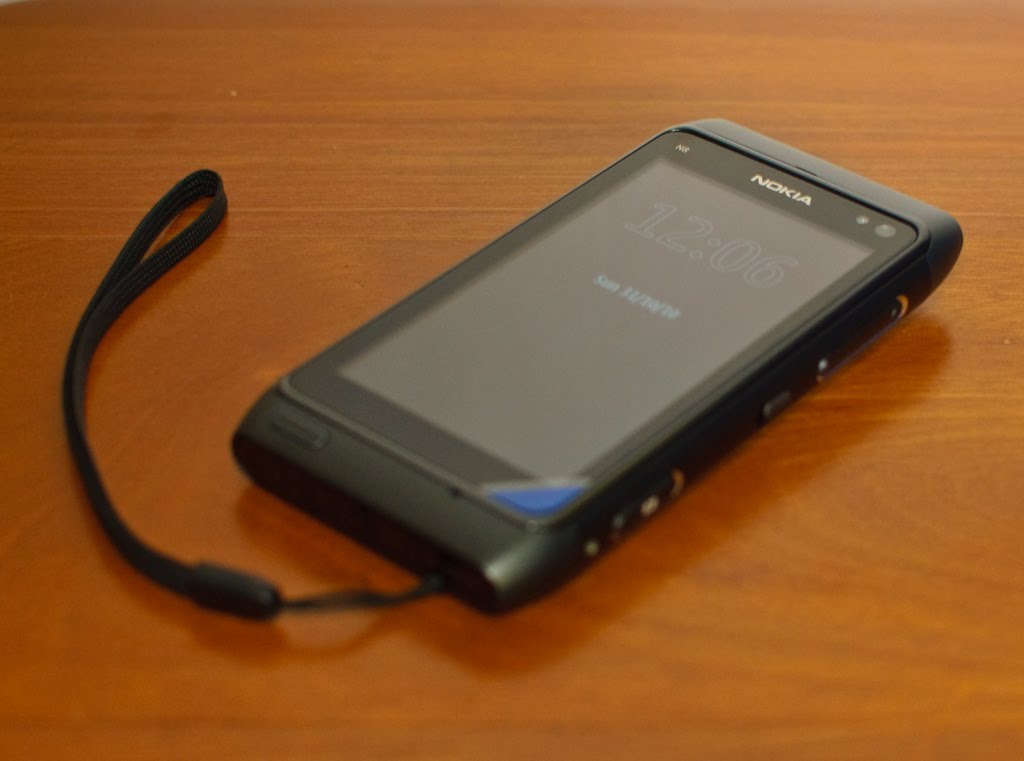
The body is made of anodised aluminum alloy at the centre with 2 plastic end covers. It feels very very good at the palm and does not feel heavy. In fact it gives you a very solid build feel, which it is. I came from Quality field so trust me on this, the exterior is very well done.

On the screen, it uses capacitive touchscreen technology on an AMOLED screen and placed the famous Gorilla glass (claimed to be very resistant to scratches and impacts) as the topmost layer of the screen. If you trust the glass enough, you can even use the phone without screen protector

For the rest of the hardware description, I will let the photos do the talking.


12 Mega Pixel Camera sensor (claimed by Nokia to be the biggest sensor used in mobile phones) with 28mm/2.8f Carl Zeiss lens. Oh it comes with Xenon flashlight, so you have strobe flash for photo capturing

The top of the phone comes with mini HDMI port (HDMI adaptor cable included) for connection to HDMI TV/projector. Besides it are the 3.5mm audio jack and power button (acts as forced shutdown when pressed for more than 10 seconds)

Left side is the MicroSD and SIM slots with microUSB port which functions as USB OTG (cable adaptor included) as well as for charging/datasync. The torx screw shown is for the bottom cover where the battery compartment is located. No easy way to replace battery unless you have a torx screwdriver

On the right side of the phone is the Camera button (which can activate the camera app with one press), the lock switch and the volume rocker. The buttons have very good tactile feel.

At the bottom, you have the mic right below the screen, the menu button (acts as task manager when press and hold for 1-2 seconds) and the mini charge port. You may wonder why 2 charging ports on N8. Simple. You can charge your phone while you are using USB keyboard/mouse thru the microUSB port (USB OTG feature). Not a frequent use case considering the massive mass memory (16GB) but useful nevertheless. Touch more on that.

Camera


The Good

- Very very good photo quality from the camera. Certainly a competent replacement for compact cameras

- Xenon flash is able to light up the subject adequately in low light condition.
- Allows geotagging
- Many scene modes to choose from, plus many manual adjustments like Exposure, White Balance, ISO, and face detection
- HD Video quality is really good with decent audio. No video/audio sync issue at all


The Bad
- Photo resolution uploaded via camera/share feature are pretty low as compared to upload it via email on the phone

- The bottom keys on the camera (Option/Exit) is not responsive to touch, esp when camera orientation is in portrait mode.


Here are some example shots:

Landscape Mode

Auto mode with Flash
Close up mode without Flash

Close up mode with flash

Phone/Screen

The Good

- Very good signal reception as compared to my Android phone in the same location = fewer dropped signals

- SMS messages now in threaded mode (finally) in the form of Conversations akin to N900 UI, as well as the old style S60 SMS folders

- SMS emoticons are supported in Conversations

- Voice call quality is superb. Loud and clear.

- Missed call/message/events widget is very useful on the home screen
- Liked the Favorite Contacts widgets, as i can add as many contacts as I can and just swipe to find the contact I want

- Screen is readable even in direct sunlight, as compared to my AMOLED Desire, which is barely readable.

- T9 Prediction on the keypad in portrait mode is good and functional

- Pictures on AMOLED is crisp and colours are adequately saturated. What you see on the N8 will be as brillant & vibrant as seen on LCD monitor. Not over-saturated like Desire, which gives user false sense of photo saturation.

The Bad

- Why the hell Nokia removed the "Slide to Pickup/Reject" feature seen in N97/5800XM? It is one of the best features in S60 5th edition and now it's gone. A step backwards.
- The search in Contacts book is not intuitive. Android/iOS phones, even N900 is able to search the contacts in real time just by typing the name. The search app is ok, but took many steps to achieve the same objective as compared to Android/iOS/Maemo counterpart.

- No choice of portrait qwerty keyboard

- Landscape keyboard is not very intuitive. I kept getting typo errors and the prediction don't help much. Have LOTS of room for improvement, Nokia may want to reference iPhone/Android keyboard for a clearer direction
-
No notification icon(s) on Big Clock screensaver. Waste of good screen estate.
- I still experience lags in the UI transitions, even though I don't install much apps (<10).>- To have Cleartype-style anti-aliasing effects on the font display or better font. Current font display feels very pixelated


Multimedia

The Good

- Loudspeaker is really LOUD

- Audio quality from the 3.5mm jack is balanced. Tight bass and clear treble

- Music Player comes with equalizer, which is lacking in Android
- Video Player can play my H.264/263 encoded avi files without re-conversion. Video shown on screen is very sharp and no audio/video sync

- Photo editor is very comprehensive for a mobile phone and workable
- Music Synchronisation is a breeze with Windows Media Player or Ovi Music Player
- HDMI output from the phone is sharp and crisp. Managed to output one Chinese movie to a 40" TV for family viewing and they were impressed by it
- USB OTG is very convenient for transfer to your photos/music/movies to/from flashdrives easliy, although it is not a very common use case for me.

The Bad
-
Need to have a ringtone trimmer software built in like Android Music Player
- No external subtitle support for video player
- No ID3 Tag editor built in like the 5th edition Music Player
- The cover flow effect is only for ALL songs category. How about Playlists, Artist, Albums, etc?
- It will be great if there is player control at the saver screen. Save the hassle of unlocking the phone just to change songs
. Yes, there's the unlock, but consider those poor dudes (like me) who have remote PIN lock by Exchange mail server remote security features.


Internet/Social Networking
Seriously, this is my main gripe in N8. I see less good than in this area. Nokia has a lot (yes I mean a lot) to catch up

The Good
- Web browser able to play flash items natively
- Able to upload photos to Facebook/Twitter via Social

The Bad
- Still using Flashlite when competitors are already having Flash 10 running on their mobiles
- Web Browser hanged when I surfed heavy sites, must have thanks to the limited RAM yet again
- No popular Photo sites upload (Flickr, Photobucket, etc)
- Social app integration is pretty weak, slow startup, erratic display,
- Nokia messaging a bit dodgy. Multiple photo uploading will prompt for email account but will not prompt if uploading only one photo.

- Email Inbox overview font is very ugly and big (bold). Doesn't blend with the UI look at all. Nokia should consider changing to better font and smaller fonts


Conclusion

After one week of use, considering I'm someone who uses internet apps and surfs extensively on the phone, I went back to Desire as my main phone and N8 as my camera/music player due to the above comments.

You also noticed that I did not touch on Ovi Maps at all, as frankly I have not used it much but I am confident in this application since this app in its earlier versions has already brought me around Thailand using my N95 8GB

Seriously, N8 hardware is uber impressive in terms of build, connectivity and camera optics, but heavily maimed by a dated OS. I strongly believe this phone will shine should it runs on Meego instead of Symbian. I have used N900 (Maemo) before so I can see Meego's potential.

N8, in its current state, is good for people who are looking for solid camera performance that can replace their compact cameras and good multimedia capabilities plus good telephony functions.

However, if you are looking for very internet-centric phone, where you will surf a lot on the phone, then it's better to look at other options.

Of course, I am still hoping in the upcoming updates, the functions/features of the phone will improve cos I certainly will like to use N8 as a main phone when that happens.

But I seriously I will hope Nokia can give the N8 users an option to load Meego instead of Symbian to see if it can bring this phone to the next level (I must be dreaming keke)

Nokia Rangers Gathering Oct 2010

Ok,

Just received the event photos from the organisers, so here's some photos of the event:

The venue and the Event

Hanseah, Dimitri_can & me

The presentation starts

Marketing manager explained how we were selected and what we should do as Rangers

Everyone listens to what was presented, and that's where I was told each of us will be given a N8

Product Manager comes in to introduce the N8. Market manager made a comment that the Rangers had probably known more about the product than him LOL

Product manager showing the N8 UI on the big screen thru HDMI

Queries with the Marketing Manager

Unboxing the received N8


The happy Rangers showing off their new toy

Checking out the phone

Conversations with the Product Manager

Sharing with fellow rangers