
Now, Meego has matured in a way where Nokia can finally market N9 as a smartphone instead of Internet Tablet, which Maemo fans has always wanted it to be.
I have gotten the N9 for trial during the Nokia Rangers event on 6th October 2011, just weeks before the N9 is officially launched. The group's task is to review the phone, and also let their friends and peers to experience the new UI implemented on the phone. with a brand new platform, Nokia needs all the publicity they can find to promote this phone and let the mass know about it.
So here you are, a review of the N9 based on my day-to-day usage since I gotten the phone.
Costmetics/Design
 I never have doubt in Nokia's mechanical competencies. They DO make solid hardware, only to be played down by their weakest link: Software. Will N9 with Meego change all that? We shall see.
I digress, back to externals.
The phone is monoblock design, as with most touchscreen smartphones nowadays. The back casing is made of polycarbonate plastic which is known to be tough and durable. So it's pretty scratchproof.
The screen glass is made of Gorilla glass that is known to resist scratches. In my use without the screen protector, I haven't even gotten a scratch on the glass at all. For your info, the phone is in my jeans (with coins and stuffs) and survived a bike crash (the phone rolled along the tarmac) with the glass scratchless.
According to Nokia, the display is assembled on the glass with ZERO air gap, hence providing very good viewing angles and gives the impression that the icons "float" on the glass. You will have to see the screen for yourself. The AMOLED display with Clear Black technology gives the display very vibrant and lively colours, and it is still visible under direct sunlight. In short, the display did not fail to impress.
The phone only have 3 mechanical buttons: Volume UP, Volume DOWN and Power/Standby button. This gives the phone a very clean look in the design. It also comes with microUSB port which is covered by a levered cover (I find it good as it protects the port from dust when not in use)
The phone comes in 16, 32 and 64GB variant and what I reviewed is the 16GB version. One of my peeve is the inability to expand my storage with a microSD as the phone do not cater for it.
Battery is also non-removable due to the design nature of the phone but for me I have no issue with that since I never have the habit of changing batteries all the time for I charge my phone everyday.
The phone comes in 16, 32 and 64GB variant and what I reviewed is the 16GB version. One of my peeve is the inability to expand my storage with a microSD as the phone do not cater for it.
Battery is also non-removable due to the design nature of the phone but for me I have no issue with that since I never have the habit of changing batteries all the time for I charge my phone everyday.


 |
| Micro USB port hidden under the spring hinged cover and MicroSIM slot beside |
Features
The phone runs on the Linux based OS called Meego, formerly called Maemo which runs on N900.
The UI concept eliminates the use of physical buttons and intended to use gestures for the common functions. Closing, minimising apps are all done with a single swipe.
There will be 3 home screens: Events, Applications and Running Tasks.
Events - This screen will show several information on the page: Twitter/Facebook feeds, Missed Calls, Unread Messages, and Calendar Appointment alerts.

Applications - This screen will show all the installed and pre-loaded apps in one page. While scrolling through the apps are smooth and fast, there is no app folder support in it so you can only manually shift your most used icons to a most convenient spot for your easy navigation. Even internet bookmarks are displayed as icons by itself, meaning if you have 30 bookmarks (conservatively speaking, but I believe normal users will have more than that) you will see 30 bookmark icons on the application screen. In my opinion, this is MESSY. Having folder support will be a great remedy to resolve this and I certainly hope Nokia will include that in the next update.
Running Tasks - This is where all the running applications are displayed in this screen, in the form of "screenshots". The application icons can be displayed in 2 x 2 grid or 3 x 3 grid, using the pinch zoom gesture. You can close the applications (other than swping down in the app itself) by press and hold on the icon and you can select the app(s) you want to close. There is also an option for you to close all at once.

Phone Functionality
Phone Speaker - With only one speaker at the bottom of the phone, it is no surprise that the volume level coming out from it will not be loud as compared to 5800 Xpressmusic or N8. Personally I find the speaker pretty soft and had a few missed calls due to not able to hear the ringtone
Phone Calls & Reception - Very typical of Nokia phone, you can always rely on their phones when comes to signal receptions and phone call quality. This is one area Nokia excels in. I can get very good reception with comparison to my other Android phone in the same area and voice quality on the ear speaker is clear, albeit slightly soft. I believe this can be tweaked in the next update.
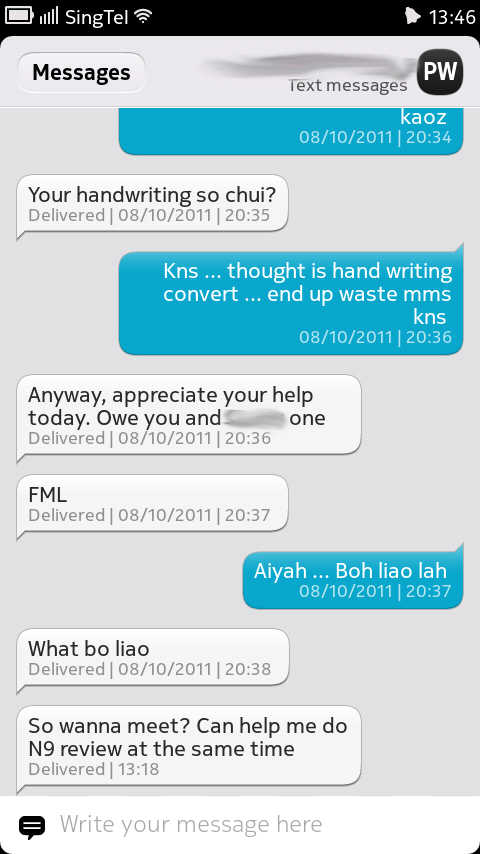
Messenging - Nokia integrated Ovi Chat, Skype, SMS, MMS and IM in one messenging client, hence you will only need to get used to one UI for all your IM accounts. Typing on the on-screen keyboard is a breeze as the prediction and correction mechanism worked wonderfully well. Coming from a user used to onscreen keyboards on big screens, this gets a thumbs up from me. Only gripe I have is the lack of Chinese input support but Nokia ensured that the Chinese IME will be included in the next update.
One negative aspect is that there is no way of customising the theme of the messenging application. While it is possible to customise it, the geeky way (coming from N900 experiences), Nokia needs to enable theme changing capability if it wants to capture the masses for this phone.


Camera
The N9 comes with a 8MP camera sensor with Carl Zeiss optics, giving the usual superior cameraphone photo quality from Nokia. It is capable of recording videos up to 720p resolution and able to perform auto focusing. There are quite a arsenal of settings for your photo taking needs. One thing I noticed on this firmware is that the macro mode focusing is not working, which I hope Nokia can fix it ASAP, since I am one of those users who uses macro mode very frequently on the phone.
You can view the photos I have taken during the course of using this phone at my Flickr site
http://www.flickr.com/photos/xgrind/sets/72157627710922683/
What I have noticed is that the camera app will start up slower as I installed the phone with more apps and media files.
Phone Calls & Reception - Very typical of Nokia phone, you can always rely on their phones when comes to signal receptions and phone call quality. This is one area Nokia excels in. I can get very good reception with comparison to my other Android phone in the same area and voice quality on the ear speaker is clear, albeit slightly soft. I believe this can be tweaked in the next update.
Messenging - Nokia integrated Ovi Chat, Skype, SMS, MMS and IM in one messenging client, hence you will only need to get used to one UI for all your IM accounts. Typing on the on-screen keyboard is a breeze as the prediction and correction mechanism worked wonderfully well. Coming from a user used to onscreen keyboards on big screens, this gets a thumbs up from me. Only gripe I have is the lack of Chinese input support but Nokia ensured that the Chinese IME will be included in the next update.
One negative aspect is that there is no way of customising the theme of the messenging application. While it is possible to customise it, the geeky way (coming from N900 experiences), Nokia needs to enable theme changing capability if it wants to capture the masses for this phone.

Camera
The N9 comes with a 8MP camera sensor with Carl Zeiss optics, giving the usual superior cameraphone photo quality from Nokia. It is capable of recording videos up to 720p resolution and able to perform auto focusing. There are quite a arsenal of settings for your photo taking needs. One thing I noticed on this firmware is that the macro mode focusing is not working, which I hope Nokia can fix it ASAP, since I am one of those users who uses macro mode very frequently on the phone.
You can view the photos I have taken during the course of using this phone at my Flickr site
http://www.flickr.com/photos/xgrind/sets/72157627710922683/
What I have noticed is that the camera app will start up slower as I installed the phone with more apps and media files.

 |
| Focusing can be made at any part of the screen, just tap on the spot |
 |
| Different photo modes are available for you to choose from |


Internet and Connectivity
Nowadays, internet browsing on phones is a common thing and user expectations on mobile browser is getting higher by the day. In N900, its internet browser is considered the fastest and capable flash-supported browser in its time. On N9, its improved browser do not fail to impress either. Page rendering is fast and able to manage flash heavy sites. The tabs/windows are opened in the form of different tasks so in the running tasks screen, you will see individual webpages from the internet browser as icons.
I don't even have issue accessing the desktop version of HWZ forums. The internet browser is fully capable of satisfying the user's internet surfing needs.
While I understand Nokia has simplicity in mind when designing the browser, meaning removing options to set an array of browser settings (except to clear cache/history/cookies), I feel restricted when I can't do any advanced settings in the browser to suit my needs. However, I feel that current browser implementation is good enough for day to day surfing needs.
The standard connectivity options like bluetooth, USB tethering are available in this phone as well, working flawlessly. Following the C7, the N9 also incorporates a NFC chip that can easily pair with a NFC equipped devices, sending locations & files to another NFC phone and other potential solutions like tapping on NFC-enabled advertisement boards for information or book a cab using NFC booking sign. What I really wanna see is an app to able to read our EzLink cards for transaction records and value.
A new addition in contrast to past Nokia phone is the inclusion of Wifi Hotspot. This means you can now share your 3G mobile broadband connection to other wifi-enabled devices by making your phone into somewhat of a mobile internet router. Setup is pretty easy and self explanatory and it also have the information of how many devices are connected to your phone and how much data is being used. Very important for those who have limited data plan.


Navigation
I only tried the Navigation twice, but the impression Nokia Maps gave me is, awesome!
Other than the gimmicky 3D buildings on the maps (which I don't really fancy), the navigation features are very complete and finding the location using search is pretty accurate.
Using the turn-by-turn navigation is a breeze and delightful experience. Lock on is fast, navigation guidance is clear and concise and the movement on the map is smooth.
With a quality navigation application, giving you free worldwide navigation, what more can you ask for?
Gaming and Multimedia
Ok, nowadays gaming is now a big part of mobile communication industry and to catch up with the competitor, how can N9 not keep up with the rest of the players?
The phone comes pre-loaded with a couple of games like customised version of Angry Birds (need to pair with other NFC phones to unlock stages), Need for Speed and Galaxy on Fire. Gamplay on the AMOLED screen gives the games a vibrant colour and the phone manages the framerates quite well. However, to me playing game on such a small screen is not entirely enjoyable since I'm already used to >4" sized screen for gaming. For those who just ventured into the smartphone world or upgrade from a low-end smartphone, you will be delighted by its gaming capability
The photo gallery is nothing new from N9, with the photos are arranged in tiles with the latest taken photos on the top. On the bottom bar is the category field where you can perform filtering based on camera taken photos or imported photos (depends on which folder you place your photos into). The gallery also supports sharing to Facebook, Flickr and Twitter and I simply love the extensive options it provides for the sharing function. You can even indicate which album to park your photos and this function is provided natively!
Transferring music to the phone is a no-brainer and a breeze to do so, BUT transferring playlists to the phone is big challenge. I stored my music collection in iTunes and I tried 3 apps: Mediasync, Doubletwist and Nokia Link, all 3 apps failed to properly transferred the music playlists over. The playlists are transferred over but the playlist contents are empty. The songs are transferred though but if you have 5GB of mp3s with different genres, it will definitely be a bloody big pain! To me, this is a MAJOR deal breaker.
Final Thoughts
The phone comes pre-loaded with a couple of games like customised version of Angry Birds (need to pair with other NFC phones to unlock stages), Need for Speed and Galaxy on Fire. Gamplay on the AMOLED screen gives the games a vibrant colour and the phone manages the framerates quite well. However, to me playing game on such a small screen is not entirely enjoyable since I'm already used to >4" sized screen for gaming. For those who just ventured into the smartphone world or upgrade from a low-end smartphone, you will be delighted by its gaming capability
The photo gallery is nothing new from N9, with the photos are arranged in tiles with the latest taken photos on the top. On the bottom bar is the category field where you can perform filtering based on camera taken photos or imported photos (depends on which folder you place your photos into). The gallery also supports sharing to Facebook, Flickr and Twitter and I simply love the extensive options it provides for the sharing function. You can even indicate which album to park your photos and this function is provided natively!
Transferring music to the phone is a no-brainer and a breeze to do so, BUT transferring playlists to the phone is big challenge. I stored my music collection in iTunes and I tried 3 apps: Mediasync, Doubletwist and Nokia Link, all 3 apps failed to properly transferred the music playlists over. The playlists are transferred over but the playlist contents are empty. The songs are transferred though but if you have 5GB of mp3s with different genres, it will definitely be a bloody big pain! To me, this is a MAJOR deal breaker.
Final Thoughts
The Good
- Great unibody design gives a good and comfortable grip on the phone
- Curved glass gives the phone a unique identity and feel
- The Swipe UI is intuitive and refreshing, with a very low learning curve. Users can easily familiarize themselves with the phone within an hour
- Good photo quality from a cameraphone, easily replacing a PnS camera
- NFC feature sees great potentials in application usage if more developers are attracted to make more apps
- Smooth internet browsing experience
- Great navigation feature and it's free
The Bad
- No direct Music control on the lock screen. This will be great if a play control widget is on the lock screen so consumers can change tracks fast without unlocking the phone.
- App folder on App Screen is highly recommended. As I add more bookmarks and apps, it's going to be a long list of icons I have to swipe thru. iOS and Android have that feature for a good reason.
- Auto focus in camera's Macro mode not working. This is a MUST FIX. I can imagine how the consumer will react upon knowledge of this.
- When using battery pack to charge using the data cable, it will prompt a message indicating not enough power from the USB to charge the phone. It is a 1A output port and it charges properly when I use a dateline-disabled USB cable. To an unsuspecting consumer, he/she will have thought that the phone is being charged but it's not.
- Music playlists from my iTunes are not properly transferred to the phone via Nokia Link.
- Why only 8GB is available for media files? What happened to the other 7+ GB? I understand some space is required for system and applications but surely we don't need 7GB for that right?
- The lack of high-quality applications like Whatsapp in the store gives the phone a losing edge against Android and iOS
I will say, for seasoned iOS and Android users, they will find pretty crippled when they switch over to N9 largely due to the lack of common apps in Android and iOS like Whatsapp and Kindle and may not enticed them to switch over to Meego. Unless Nokia worked with developers intensively to push out good quality apps within a couple of months, N9 will lose its novelity pretty fast and people will just forget about this phone.
Personally, having used Symbian, Maemo, Android and now Meego, I see a good potential in this OS and I certainly wish to see this OS mature at a faster pace to join the mainstream market. It will be a waste if the OS is cast to oblivion due to slow development of apps that detract potential users away.
- No direct Music control on the lock screen. This will be great if a play control widget is on the lock screen so consumers can change tracks fast without unlocking the phone.
- App folder on App Screen is highly recommended. As I add more bookmarks and apps, it's going to be a long list of icons I have to swipe thru. iOS and Android have that feature for a good reason.
- Auto focus in camera's Macro mode not working. This is a MUST FIX. I can imagine how the consumer will react upon knowledge of this.
- When using battery pack to charge using the data cable, it will prompt a message indicating not enough power from the USB to charge the phone. It is a 1A output port and it charges properly when I use a dateline-disabled USB cable. To an unsuspecting consumer, he/she will have thought that the phone is being charged but it's not.
- Music playlists from my iTunes are not properly transferred to the phone via Nokia Link.
- Why only 8GB is available for media files? What happened to the other 7+ GB? I understand some space is required for system and applications but surely we don't need 7GB for that right?
- The lack of high-quality applications like Whatsapp in the store gives the phone a losing edge against Android and iOS
I will say, for seasoned iOS and Android users, they will find pretty crippled when they switch over to N9 largely due to the lack of common apps in Android and iOS like Whatsapp and Kindle and may not enticed them to switch over to Meego. Unless Nokia worked with developers intensively to push out good quality apps within a couple of months, N9 will lose its novelity pretty fast and people will just forget about this phone.
Personally, having used Symbian, Maemo, Android and now Meego, I see a good potential in this OS and I certainly wish to see this OS mature at a faster pace to join the mainstream market. It will be a waste if the OS is cast to oblivion due to slow development of apps that detract potential users away.


